
Part 1 defined IProductRepository as a port in the application layer. This part implements it properly, and — more importantly — draws the lines that keep the repository pattern useful instead of turning it into ceremony: what belongs in a repository, what belongs in the DbContext, and when you shouldn't write a repository at all.
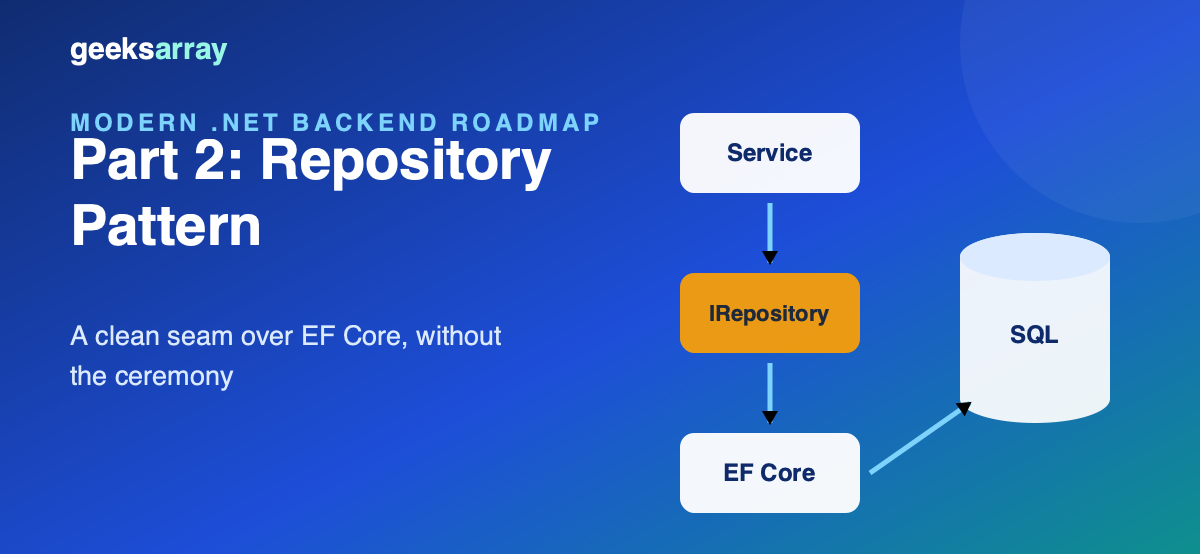
Why a repository, when DbContext already is one
EF Core's DbContext is a unit of work, and DbSet<T> is a repository — Microsoft says so in the docs. So why wrap them?
Three honest reasons:
- The dependency rule. Our application layer cannot reference EF Core (part 1), so it needs an interface it owns. The repository is that seam.
- Testability without a database.
ProductServicetests run against a ten-line fake instead of an in-memory provider with subtle behavioral differences. - A curated query surface.
IQueryableleaking everywhere means every controller can accidentally write a table scan. A repository exposes the queries the domain actually needs, by name.
If none of these apply to your app — small service, EF everywhere, integration tests with a real database — using DbContext directly is not a sin. The pattern earns its cost in layered codebases, not everywhere.
The interface, shaped by use cases
public interface IProductRepository
{
    Task<Product?> GetAsync(int id, CancellationToken ct = default);
    Task<IReadOnlyList<Product>> ListAsync(CancellationToken ct = default);
    Task AddAsync(Product product, CancellationToken ct = default);
    Task SaveChangesAsync(CancellationToken ct = default);
}
Notice what's not here: no Update, no Delete, no Func<IQueryable, IQueryable> escape hatch. EF Core's change tracker makes Update unnecessary for loaded entities — mutate and save. Methods appear when use cases need them, not speculatively. And returning IReadOnlyList instead of IQueryable keeps query composition (and its performance surprises) inside the adapter.
The EF Core implementation
public class EfProductRepository(AppDbContext db) : IProductRepository
{
    public Task<Product?> GetAsync(int id, CancellationToken ct = default) =>
        db.Products.FirstOrDefaultAsync(p => p.Id == id, ct);

    public async Task<IReadOnlyList<Product>> ListAsync(CancellationToken ct = default) =>
        await db.Products.AsNoTracking().OrderBy(p => p.Id).ToListAsync(ct);

    public async Task AddAsync(Product product, CancellationToken ct = default) =>
        await db.Products.AddAsync(product, ct);

    public Task SaveChangesAsync(CancellationToken ct = default) => db.SaveChangesAsync(ct);
}
Details that matter:
AsNoTrackingon reads that won't be mutated. The change tracker costs memory and time; listings don't need it.GetAsyncstays tracked becauseReserveAsyncmutates the result.SaveChangesAsyncon the repository, called by the use case. The service decides when a unit of work completes — after the domain rule ran. Repositories that auto-save on everyAddmake multi-entity operations non-atomic.- Cancellation tokens everywhere. They flow from the HTTP request; a client that disconnects stops the query instead of burning the connection pool.
The DbContext keeps mapping concerns where they belong:
protected override void OnModelCreating(ModelBuilder modelBuilder)
{
    modelBuilder.Entity<Product>(b =>
    {
        b.Property(p => p.Name).IsRequired().HasMaxLength(120);
        b.Property(p => p.Price).HasPrecision(10, 2);
        b.HasIndex(p => p.Name).IsUnique();
    });
}
Registration and lifetimes
builder.Services.AddDbContext<AppDbContext>(o => o.UseSqlite(connectionString));
builder.Services.AddScoped<IProductRepository, EfProductRepository>();
builder.Services.AddScoped<ProductService>();
AddDbContext registers the context as scoped — one instance per HTTP request — so the repository must be scoped too. A singleton repository holding a scoped DbContext is the classic captive-dependency bug: the container will happily build it, and you'll debug "second request throws ObjectDisposedException" at 2 a.m.
Verified behavior
The full loop — controller → service → repository → SQLite — captured from the running API:
GET /products
[{"id":1,"name":"Mechanical keyboard","price":89.0,"stock":14},
 {"id":2,"name":"4K monitor","price":329.99,"stock":2},
 {"id":3,"name":"USB-C dock","price":149.5,"stock":0}]

POST /products/2/reserve?quantity=99   → 409 {"error":"Only 2 left in stock."}
POST /products/2/reserve?quantity=1    → 200 {"id":2,...,"stock":1}
The 409 comes from the domain entity, travels through the repository's SaveChangesAsync never being reached, and gets translated by the controller. Every layer does one job.
Repositories and aggregates: what one repository covers
The unit a repository guards is an aggregate — a cluster of objects that change together under one consistency rule. An Order with its OrderLines is one aggregate: you never save a line without its order, so there is one IOrderRepository whose GetAsync loads the lines too:
public Task<Order?> GetAsync(int id, CancellationToken ct = default) =>
    db.Orders.Include(o => o.Lines).FirstOrDefaultAsync(o => o.Id == id, ct);
Symptoms that your aggregate boundaries are wrong:
- A "repository" that exists only because a table exists (
OrderLineRepository) — lines never load without their order; delete it. - Use cases that must call three repositories and save them in one transaction, every time — those three probably form one aggregate.
- An aggregate so large that loading it brings back hundreds of rows — split it, and let the pieces reference each other by id instead of navigation property.
Getting this right matters beyond tidiness: aggregate boundaries are the future service boundaries if the system ever goes distributed (part 9), and they decide what your transactions look like today.
Queries that don't fit the repository
Not every read belongs behind IProductRepository. Three escape hatches, in order of preference:
- Read-model query services — a separate port like
IProductReadQueriesreturning purpose-built records. Part 3 implements exactly this with Dapper; the repository stays focused on aggregates, reporting stays honest about being reporting. - Specification-lite methods — when a listing needs a few filter combinations, add intent-revealing methods (
ListLowStockAsync(threshold)) rather than a genericFindAsync(predicate). Names document the domain; predicates document nothing. - Pagination as a first-class contract — collections that grow need
ListAsync(int page, int size)returning aPagedResult<T>(items + total). Bolting paging on later touches every caller; design it in when the entity is born.
What you should not do is add IQueryable<Product> Query() — that isn't an escape hatch, it's demolition. Every guarantee the repository makes (curated queries, no accidental lazy loads, testable surface) evaporates through that one method.
Concurrency: the update conflict you will eventually have
Two admins edit the same product; last write silently wins, and stock goes wrong. EF Core's optimistic concurrency closes this with a token column:
b.Property(p => p.Version).IsRowVersion(); // SQL Server rowversion / xmin on PostgreSQL
When SaveChangesAsync detects the row changed under you, it throws DbUpdateConcurrencyException. Translate it at the adapter so the application layer deals in domain language:
public async Task SaveChangesAsync(CancellationToken ct = default)
{
    try { await db.SaveChangesAsync(ct); }
    catch (DbUpdateConcurrencyException)
    { throw new ConflictException("The product was modified by someone else. Reload and retry."); }
}
The controller maps ConflictException to HTTP 409, the UI offers a reload — and the repository seam is what let each layer handle its own concern.
Anti-patterns to dodge
- The generic repository (
IRepository<T>withGetAll()/Find(predicate)). It re-exposesIQueryablewith extra steps and names nothing about the domain. Specific repositories with use-case methods age far better. - Repository-per-table. Repositories guard aggregates, not tables. An
Orderrepository loads the order with its lines; there is noOrderLineRepository. - Leaking EF exceptions. Wrap unique-violation and concurrency exceptions into domain-meaningful results at the adapter, or your application layer grows
catch (DbUpdateException)and the boundary dissolves.
Next
Repositories give the write side a clean seam. But some reads want none of this — they want three columns from a hand-tuned SQL statement, fast. That's part 3: Dapper on the read path, living side by side with EF Core.
Comments (0)
No comments yet — be the first to share your thoughts.