
Almost every software team is now being asked the same question: how do we add AI to the product we already have? For the many companies that run on .NET (banks, insurers, healthcare systems, ERP vendors and SaaS products), the people who can answer it are developers who understand both worlds: solid C# and ASP.NET Core on one side, and large language models, embeddings and agents on the other.
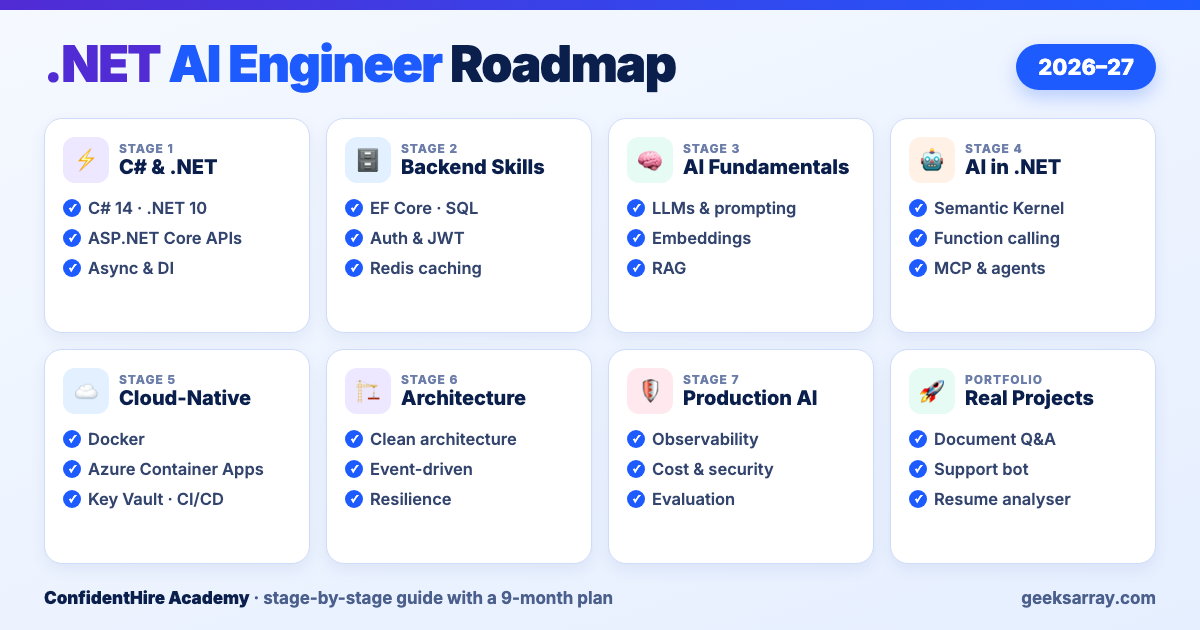
That combination has a name now: the .NET AI engineer. This guide lays out a practical path to becoming one in 2026–27, in the order we recommend learning it, with a realistic time plan and the projects that prove you can do the job.
What a .NET AI engineer actually does
A .NET AI engineer is not a data scientist and does not train models from scratch. The job is to build reliable software around AI models: an ASP.NET Core API that answers questions from a company's documents, a support assistant that can look up an order and raise a ticket, a background service that summarises thousands of claims a day, all running securely in the cloud and within a budget.
In practice that means three skills on top of normal backend work:
- Calling and orchestrating models: sending the right context to an LLM, parsing its output, and letting it call your own functions.
- Grounding answers in your data: turning documents into embeddings, storing them in a vector database and retrieving the right pieces at the right time (RAG).
- Running AI in production: logging, cost control, safety checks and evaluation, so the feature still works after the demo.
The good news for .NET developers: about half of this roadmap is skills you either have already or would need for any senior backend role.
Stage 1: Modern C# and .NET foundations (6–8 weeks)
Everything else sits on this layer, so it is worth doing properly even if you have used .NET before.
- C# you will use every day: records, pattern matching, nullable reference types, LINQ, generics and, above all,
async/await. AI calls are slow network calls; code that blocks threads or forgets cancellation tokens falls over under load. - ASP.NET Core: controllers and Minimal APIs, routing, model binding and validation, middleware, configuration and the options pattern.
- Dependency injection: registering services with the right lifetime. You will register AI clients, vector stores and tools the same way.
- Streaming responses: returning results as they are generated (
IAsyncEnumerable, server-sent events), which is how chat interfaces feel fast.
Aim to stay current: .NET 10 is the long-term-support release, so it is the version employers will standardise on through 2027.
Checkpoint: build a small REST API with authentication, validation, async database calls and automated tests.
Stage 2: Backend skills that AI features depend on (6 weeks)
An AI feature is still a backend feature. It reads data, checks permissions and must not leak information.
- Data access: Entity Framework Core for most work, Dapper where you need raw speed, and a working knowledge of SQL Server or PostgreSQL, plus one document database such as MongoDB or Cosmos DB.
- Security: authentication with JWT or OpenID Connect, role- and policy-based authorisation. In AI apps this decides which documents a user's question is allowed to see.
- Caching with Redis: repeated prompts and embeddings are expensive; caching them cuts both latency and cost.
- Background processing: hosted services and queues for long jobs such as ingesting a thousand PDFs.
Checkpoint: extend your API with role-based access, a Redis cache and a background job that processes uploaded files.
Stage 3: AI fundamentals every engineer needs (4 weeks)
You do not need heavy maths here, but you do need an accurate mental model of how LLMs behave, because most AI bugs come from wrong assumptions.
- How LLMs work in practice: tokens, context windows, temperature, and why the same prompt can give different answers.
- Prompt engineering: clear instructions, examples, structured (JSON) output and system prompts that set boundaries.
- Embeddings: turning text into vectors so that "refund policy" and "how do I get my money back" end up close together.
- Vector databases: Azure AI Search, PostgreSQL with pgvector, Qdrant and similar stores, and how similarity search works.
- Retrieval-Augmented Generation (RAG): splitting documents into chunks, retrieving the most relevant ones and passing them to the model, so answers come from your data rather than the model's memory.
- Limits and risks: hallucination, prompt injection and data privacy, and why you test AI output instead of trusting it.
Checkpoint: explain, in your own words and with a diagram, what happens between a user typing a question and your app showing a grounded answer.
Stage 4: Building AI into .NET applications (6–8 weeks)
This is where the .NET ecosystem has matured quickly, and where most of your project work will happen.
- Microsoft.Extensions.AI: a common set of abstractions (such as
IChatClientand embedding generators) that lets you swap model providers without rewriting your app, and plugs into the dependency injection and logging you learned in Stage 1. - Semantic Kernel: Microsoft's SDK for orchestration: prompt templates, plugins that expose your C# methods to the model, memory and planning.
- Model providers: Azure OpenAI and Azure AI Foundry for enterprise deployments, the OpenAI API directly, and local models through tools such as Ollama for development and privacy-sensitive work.
- Function (tool) calling: describing your methods so the model can decide to call
GetOrderStatus(orderId)instead of guessing an answer. This is the step from chatbot to assistant. - Model Context Protocol (MCP): an open standard for exposing tools and data to AI applications and agents, with an official C# SDK. Learning it now means your tools can be reused by any MCP-compatible client.
- Agents: loops where a model plans, calls tools, checks results and continues. Start with single-agent workflows before trying multi-agent systems; they are much harder to test.
Checkpoint: a document question-answering API that uses RAG, cites its sources and can call at least one of your own functions.
Stage 5: Cloud-native deployment (4–6 weeks)
AI apps are almost always deployed to the cloud, close to the models they call.
- Containers: Dockerfiles for ASP.NET Core apps, multi-stage builds and environment-based configuration.
- Azure hosting choices: App Service for simple web apps, Container Apps for containerised services that scale to zero, and Azure Functions for event-driven jobs such as "a document was uploaded, index it".
- Secrets and integration: Azure Key Vault so API keys never live in code, Service Bus for reliable messaging, and API Management to put rate limits in front of expensive endpoints.
- Kubernetes basics: enough to understand pods, deployments and services, because many larger employers run on AKS.
Checkpoint: deploy your Stage 4 project to Azure with secrets in Key Vault and a CI/CD pipeline that runs tests before every release.
Stage 6: Architecture for AI systems (ongoing)
As your projects grow, structure matters more than any single library.
- Clean and vertical-slice architecture: keep AI calls behind interfaces so business logic can be tested without a live model.
- Microservices and event-driven design: separate ingestion, retrieval and chat into services that scale independently.
- CQRS and design patterns: useful for keeping read-heavy AI features (search, summaries) apart from write paths.
- Distributed systems thinking: timeouts, retries with back-off, idempotency and graceful fallbacks when a model provider is slow or down.
Stage 7: Production AI (ongoing, and what interviewers probe most)
This is the stage that separates engineers from tutorial-followers.
- Observability: log prompts, responses, token counts and latency (with personal data masked) using OpenTelemetry, so you can see what the model was actually asked.
- Cost control: choose smaller models where they are good enough, cache aggressively, cap tokens and set budgets per user or tenant.
- Security: defend against prompt injection, never let the model see data the user is not authorised for, and filter harmful output.
- Rate limiting and resilience: protect both your users and your provider quota.
- Evaluation: keep a test set of real questions with expected answers and run it whenever you change a prompt, model or retrieval setting. If you cannot measure quality, you cannot safely improve it.
Projects that prove you can do the job
Recruiters and interviewers care far more about what you have built than about the list of libraries on your CV. Three to four solid projects on GitHub, each with a clear README and a short demo video, are enough:
| Project | What it shows |
|---|---|
| Document Q&A assistant | RAG, embeddings, a vector store, citing sources, access control |
| Customer support bot with tools | Function calling, real APIs (orders, tickets), conversation state |
| Resume analyser | Structured JSON output, parsing documents, evaluation against sample CVs |
| Code review assistant | Working with large inputs, prompt design, CI/CD integration |
| Multi-agent workflow (advanced) | Orchestration, agent hand-offs, observability and cost tracking |
Build each project to production habits: configuration in Key Vault, logs you can read, tests, and a note on what it costs to run.
A realistic time plan
If you study around 10–12 hours a week alongside a job or college:
| Months | Focus |
|---|---|
| 1–2 | Modern C#, ASP.NET Core, async, dependency injection |
| 3 | Data access, security, caching, background jobs |
| 4 | AI fundamentals: LLMs, prompting, embeddings, RAG |
| 5–6 | Microsoft.Extensions.AI, Semantic Kernel, function calling, MCP; first two projects |
| 7 | Docker, Azure deployment, CI/CD |
| 8–9 | Production AI: observability, cost, security, evaluation; final projects and interview preparation |
Experienced .NET developers can usually move faster through months 1–3 and reach AI integration within a few weeks.
Where to start this week
- Pick one modern .NET API you can build end to end, even a small one.
- Get an API key for one model provider (or install a local model) and make your API answer a question with it.
- Add one document and make the answer cite it. That is your first RAG system.
From there, follow the stages above one at a time. The field moves quickly, but the foundations in this roadmap (clean .NET code, secure APIs, grounded answers and production discipline) are what will still matter in 2027.
At ConfidentHire Academy, our Full Stack .NET 10 + AI Engineering programme follows this same path, with live sessions, hands-on projects and interview preparation. The next morning batch starts on 23 November 2026.
Comments (0)
No comments yet — be the first to share your thoughts.