

Low-code and no-code (LCNC) platforms let you build working software mostly by configuring visual components and declarative rules instead of hand-writing every line. By 2026 they have moved from novelty to mainstream: analysts estimate the majority of new business applications now involve some LCNC tooling, driven by a shortage of developers, cheap AI-assisted generation, and relentless pressure to ship internal tools faster. This article explains what these platforms actually are, where they win, where traditional code still wins, and how professional developers fit into the picture rather than getting replaced by it.
What "low-code" and "no-code" actually mean
The terms describe a spectrum, not two rival camps. At one end, no-code platforms target non-programmers ("citizen developers") who assemble apps entirely through drag-and-drop UIs, spreadsheets, and point-and-click logic. At the other end, low-code platforms accelerate professional developers with visual builders but still expose escape hatches for real code. Beyond both sits pro-code: everything written by hand in a general-purpose language.
A rough map of the landscape:
- No-code: Airtable, Bubble, Power Apps (canvas apps), Glide, Zapier.
- Low-code: OutSystems, Mendix, Microsoft Power Platform, Retool, Appsmith.
- Pro-code: .NET 10, ASP.NET Core, Angular 19, and the rest of the traditional stack.
The boundary is fuzzy on purpose. Power Platform, for example, spans no-code Power Apps, low-code Power Automate flows, and pro-code Azure Functions all in one governed environment.
Why LCNC surged by 2026
Three forces converged. First, demand for software outran the supply of engineers by a wide margin, so organizations pushed simple app-building toward the people who understand the business problem. Second, generative AI turned natural-language prompts into starting scaffolds, collapsing the gap between "describe it" and "run it." Third, the platforms matured: modern LCNC tools now offer version control, environments, role-based security, and CI/CD hooks that make them defensible for production use rather than throwaway prototypes.
The "configure, don't code" idea
The core mental shift is declarative: you describe what should happen and the platform decides how. A workflow automation is often just a trigger plus a list of actions, stored as structured data rather than imperative code.
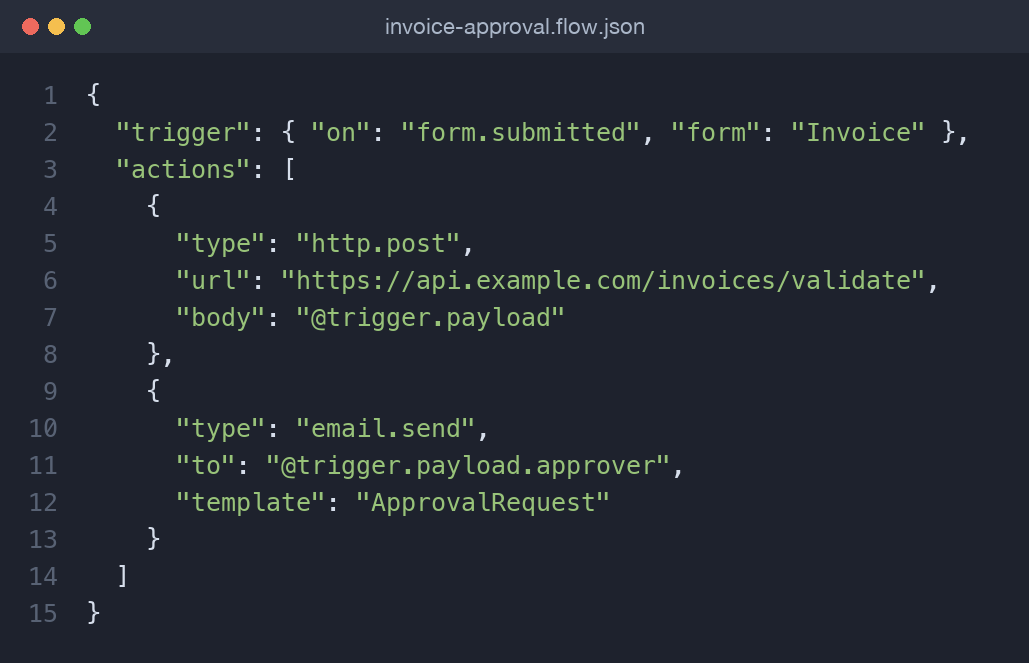
That same definition could drive a Power Automate flow, a Zapier zap, or a Retool workflow. Nobody wrote a loop, opened a database connection, or handled an HTTP retry by hand — the runtime does all of it. This is the appeal and, as we will see, also the constraint.
Where LCNC clearly wins
LCNC shines when the value is in speed and proximity to the problem, not in algorithmic depth:
- Internal tools: admin panels, approval dashboards, and CRUD apps over an existing database. Retool and Appsmith can wrap a SQL Server 2025 table in a usable UI in an afternoon.
- Workflow automation: routing form submissions, syncing systems, sending notifications, glue between SaaS products.
- MVPs and validation: getting a testable product in front of users before committing real engineering budget.
- Citizen development: letting an operations lead build the tool they need without a six-month IT queue.
In these cases, hand-coding is often the more expensive and riskier choice.
Where traditional code still wins
LCNC hits a ceiling exactly where software gets hard:
- Complex domain logic: intricate pricing engines, regulatory calculations, or state machines are painful to express in visual builders and become unreadable fast.
- Performance and scale: high-throughput, low-latency systems need control over data structures, caching, and concurrency that abstractions hide.
- Deep integrations: bespoke protocols, legacy systems, or fine-grained transactional guarantees usually demand real code.
- Longevity and portability: anything you expect to run and evolve for a decade is safer in an open, standard stack like .NET 10 and EF Core 10.
A good heuristic: if the interesting part of the system is its logic, lean toward code; if the interesting part is assembly and delivery, lean toward LCNC.
The real trade-offs
No platform is free. The honest costs of going LCNC include:
- Speed versus control: you trade fine-grained control for velocity. Great early, frustrating when requirements outgrow the tool's model.
- Vendor lock-in: your logic lives inside a proprietary runtime. Migrating off OutSystems or Bubble is a rewrite, not an export.
- Governance sprawl: when anyone can ship an app, you get shadow IT, ungoverned data access, and security gaps unless you put guardrails in place.
- Hidden technical debt: visual flows still rot. A 60-step Power Automate flow with no tests is as brittle as any spaghetti codebase, just harder to review.
None of these disqualify LCNC; they just mean it needs the same engineering discipline as anything else.
How professional developers fit in
The winning pattern in 2026 is not "developers versus citizen developers" but fusion teams: business builders and engineers working on the same platform, each doing what they are best at. Professional developers add value by:
- Extending LCNC with custom code: dropping into a low-code app to write a C# 14 Azure Function or a custom Retool component when the visual tools run out.
- Owning the APIs: exposing clean, well-versioned services (ASP.NET Core minimal APIs) that citizen developers consume safely, so the hard logic stays in code and the assembly stays low-code.
- Establishing governance: environments, review gates, data-loss-prevention policies, and reusable components that keep the citizen-developer layer safe at scale.
- Choosing the boundary: deciding, per feature, what belongs in LCNC and what belongs in the core system.
In other words, LCNC does not remove engineering — it relocates it toward architecture, integration, and governance.
A concrete example makes this tangible. Suppose the operations team needs a tool to review and approve vendor invoices. A citizen developer builds the entire UI and approval flow in Power Apps and Power Automate in a few days. But the actual tax and discount calculation is regulated and non-trivial, so a developer exposes it as an ASP.NET Core minimal API backed by EF Core 10 and SQL Server 2025, and the low-code flow simply calls it. The business owns the parts that change weekly; engineering owns the part that must be correct. Neither side reinvents the other's work.
How to choose and adopt a platform
Treat platform selection as an architectural decision, not a purchasing one. A few questions worth asking before you commit:
- What is the escape hatch? Can you drop into real code — a custom component, a function, a raw SQL query — when the visual model runs out? A platform with no exit becomes a trap.
- How does it handle lifecycle? Look for environments (dev/test/prod), source control integration, and repeatable deployments. If changes are edited live in production, you do not have an engineering platform.
- Where does the data live, and who can reach it? Data-loss-prevention policies and role-based access decide whether citizen development is safe or a breach waiting to happen.
- What does exit look like? Even if you never leave, knowing the migration cost keeps the lock-in trade-off honest.
Adopt incrementally. Start with a low-risk internal tool, establish the governance and review conventions on that small footprint, then widen access once the guardrails are proven. Trying to roll out a citizen-developer program across an org with no environments, no review, and no shared component library is how you accumulate the technical debt described above.
What to learn
For developers, the skill that matters is not any single vendor's UI — those change. It is judgment about the boundary: recognizing which problems are assembly-and-delivery (hand them to LCNC) and which are logic-and-scale (keep them in code). Beyond that, learn to design clean, versioned APIs, since they are the seam where the two worlds meet, and get comfortable with at least one major platform — Power Platform is a safe bet given its reach — so you can lead a fusion team rather than resist it.
Key takeaways
- LCNC is a spectrum from no-code (Airtable, Bubble, Power Apps) through low-code (OutSystems, Mendix, Retool) to pro-code.
- Its 2026 surge is driven by the developer shortage, AI-assisted generation, and genuinely production-ready platforms.
- Use it for internal tools, automation, MVPs, and citizen development; keep complex logic, performance-critical paths, and long-lived systems in code.
- The real costs are lock-in, governance sprawl, and hidden technical debt — manage them deliberately.
- Fusion teams, where developers own APIs and governance while builders assemble apps, are the model that scales.
Frequently asked questions
Will low-code and no-code replace software developers?
No. LCNC removes repetitive assembly work but increases demand for developers who can design APIs, integrate systems, and govern platforms. The role shifts toward architecture and integration rather than disappearing.
What is the difference between low-code and no-code?
No-code targets non-programmers building complete apps through visual tools with no coding at all. Low-code targets developers, using visual builders for speed but keeping escape hatches to write real code where needed.
When should I avoid LCNC and write traditional code?
Avoid it when the core value is complex domain logic, strict performance or scale requirements, deep custom integrations, or long-term portability. In those cases an open stack like .NET 10 gives you the control and longevity LCNC cannot.
Is vendor lock-in a serious risk with LCNC platforms?
Yes. Your logic lives in a proprietary runtime, so leaving usually means rebuilding rather than exporting. Mitigate it by keeping critical business logic in your own APIs and using LCNC mainly for the assembly and UI layer.
Comments (0)
No comments yet — be the first to share your thoughts.