

Our pipeline produces a tested container image in ECR for every merge. Now it needs somewhere to run. On AWS the simplest production-grade answer is Amazon ECS with Fargate: you describe the container and how many copies you want, and AWS runs them without you managing a single server. This part deploys the image behind an Application Load Balancer and wires the pipeline to roll out every new version automatically.
ECS in one picture
ECS has four concepts, nested inside each other:
- Cluster — a logical grouping of services. With Fargate it costs nothing by itself; it is just a namespace.
- Task definition — the blueprint: which image, how much CPU and memory, which port, environment variables, secrets and the IAM roles to use. It is versioned; every change creates a new revision.
- Task — a running instance of a task definition, typically one container (or a small group, such as an app plus a sidecar).
- Service — keeps a desired number of tasks running, replaces failed ones, registers them with a load balancer and performs rolling deployments.
Fargate is the launch type where AWS provides the compute. You pay for the vCPU and memory your tasks request, per second. The alternative, the EC2 launch type, runs tasks on instances you manage. Start with Fargate; move to EC2 only for specific cost or hardware needs.
Building a production-ready image
ECS will run whatever image you give it, so quality starts in the Dockerfile. A few rules make a large difference in security, size and startup time:
- Use a multi-stage build: compile in a full SDK image, copy only the output into a slim runtime image.
- Run as a non-root user.
- Copy dependency manifests and install them before copying source, for better layer caching.
- Add a health endpoint in the application (for example
/health) that the load balancer can call.
FROM node:22-slim AS build
WORKDIR /app
COPY package*.json ./
RUN npm ci
COPY . .
RUN npm run build && npm prune --omit=dev

FROM node:22-slim
WORKDIR /app
ENV NODE_ENV=production
COPY --from=build /app/node_modules ./node_modules
COPY --from=build /app/dist ./dist
USER node
EXPOSE 8080
CMD ["node", "dist/server.js"]
Two roles, two jobs
A task definition references two different IAM roles, and mixing them up is a classic mistake:
- The task execution role is used by ECS itself, before and around your container: pulling the image from ECR, writing logs to CloudWatch and fetching secrets to inject as environment variables. The AWS managed policy
AmazonECSTaskExecutionRolePolicycovers the basics; addsecretsmanager:GetSecretValuefor the specific secrets you inject. - The task role is used by your application code when it calls AWS APIs, such as reading from S3 or publishing to SQS. Grant it only what the application needs.
If your container starts but cannot read its S3 bucket, check the task role. If the task never starts with a "CannotPullContainerError" or a secrets error, check the execution role (and the NAT route from part three).
The task definition
Here is the heart of the deployment, written in Terraform:
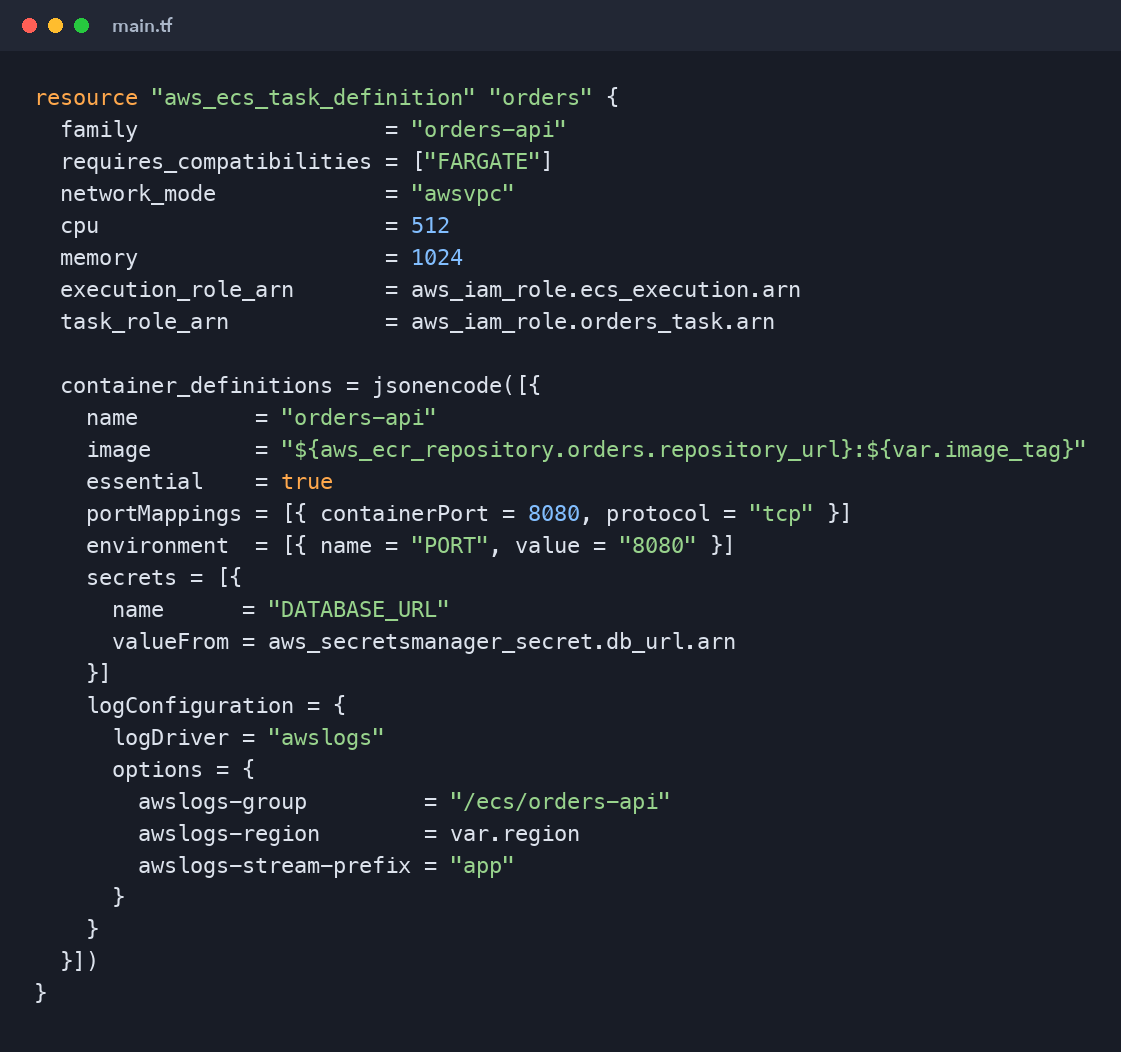
resource "aws_ecs_task_definition" "orders" {
  family                   = "orders-api"
  requires_compatibilities = ["FARGATE"]
  network_mode             = "awsvpc"
  cpu                      = 512
  memory                   = 1024
  execution_role_arn       = aws_iam_role.ecs_execution.arn
  task_role_arn            = aws_iam_role.orders_task.arn

  container_definitions = jsonencode([{
    name         = "orders-api"
    image        = "${aws_ecr_repository.orders.repository_url}:${var.image_tag}"
    essential    = true
    portMappings = [{ containerPort = 8080, protocol = "tcp" }]
    environment  = [{ name = "PORT", value = "8080" }]
    secrets = [{
      name      = "DATABASE_URL"
      valueFrom = aws_secretsmanager_secret.db_url.arn
    }]
    logConfiguration = {
      logDriver = "awslogs"
      options = {
        awslogs-group         = "/ecs/orders-api"
        awslogs-region        = var.region
        awslogs-stream-prefix = "app"
      }
    }
  }])
}
network_mode = "awsvpc" gives each task its own network interface and private IP in your subnets, and lets you attach security groups directly to tasks. Fargate requires it. The secrets block pulls the database URL from Secrets Manager at start-up, so it never appears in the task definition, the image or Git.
The service and the load balancer
The service runs two tasks across the two private subnets and registers them with an ALB target group:
resource "aws_ecs_service" "orders" {
  name            = "orders-api"
  cluster         = aws_ecs_cluster.main.id
  task_definition = aws_ecs_task_definition.orders.arn
  desired_count   = 2
  launch_type     = "FARGATE"

  network_configuration {
    subnets         = module.vpc.private_subnets
    security_groups = [aws_security_group.app.id]
  }

  load_balancer {
    target_group_arn = aws_lb_target_group.orders.arn
    container_name   = "orders-api"
    container_port   = 8080
  }

  deployment_circuit_breaker {
    enable   = true
    rollback = true
  }
}
The target group's health check should call the application's /health path. ECS only considers a new task healthy once the load balancer does, which is what makes rolling deployments safe.
How a rolling deployment works
When the service's task definition changes, ECS performs a rolling update governed by two settings: minimum healthy percent (default 100) and maximum percent (default 200). With two tasks, ECS starts two new tasks, waits for them to pass health checks, shifts traffic, then drains and stops the old ones. Users see no downtime.
The deployment circuit breaker is the safety net. If new tasks keep failing to start or failing health checks, ECS stops the deployment and, with rollback = true, returns the service to the last working revision automatically. Turn it on for every service.
Deploying from the pipeline
Terraform owns the cluster, service and initial task definition. The pipeline owns the image tag. The common pattern is to let the pipeline render a new task definition revision with the new image and update the service, using AWS's official actions:
- uses: aws-actions/amazon-ecs-render-task-definition@v1
  id: render
  with:
    task-definition: deploy/task-definition.json
    container-name: orders-api
    image: ${{ needs.build-and-push.outputs.image }}

- uses: aws-actions/amazon-ecs-deploy-task-definition@v2
  with:
    task-definition: ${{ steps.render.outputs.task-definition }}
    service: orders-api
    cluster: orders-dev
    wait-for-service-stability: true
wait-for-service-stability makes the job wait until the rollout finishes, so a failed deployment turns the pipeline red instead of failing silently. Add lifecycle { ignore_changes = [task_definition] } to the service in Terraform so a later terraform apply does not revert the pipeline's deployment.
Autoscaling
Fixed task counts waste money at night and fall over during peaks. Application Auto Scaling adjusts desired_count with a target-tracking policy, for example keeping average CPU around 60%, between a minimum of two tasks for availability and a sensible maximum as a cost guardrail.
Key takeaways
- A service keeps a desired number of tasks running from a versioned task definition.
- The execution role is for ECS (pull, logs, secrets); the task role is for your code.
- Run tasks in private subnets behind an ALB, with health checks on a real
/healthendpoint. - Enable the deployment circuit breaker with rollback, and let the pipeline wait for service stability.
What's next
ECS is the fastest path to running containers on AWS. Many organisations standardise on Kubernetes instead, so part eight deploys the same image to Amazon EKS and compares the two paths honestly.
Comments (0)
No comments yet — be the first to share your thoughts.