

This is the part where the pieces start moving on their own. We have an IAM role that trusts GitHub through OIDC (part two), infrastructure in Terraform (part four) and a protected main branch with SHA-based versioning (part five). Now we build the GitHub Actions pipeline that tests every change, builds a container image, authenticates to AWS without stored keys and pushes the image to Amazon ECR.
Why GitHub Actions for AWS
AWS has a native CI/CD suite (CodePipeline and CodeBuild), and many enterprises use it. GitHub Actions has become the default for a large share of teams because the pipeline lives next to the code, pull-request checks are built in, and there is a large marketplace of maintained actions, including official ones from AWS. The concepts transfer directly: a CodeBuild buildspec.yml and a GitHub Actions job are two syntaxes for the same idea.
Workflow anatomy
A workflow is a YAML file in .github/workflows/. It has three layers:
- Triggers (
on:) — which events start it: pushes, pull requests, tags, schedules or manual runs. - Jobs — independent units that run on fresh virtual machines (runners), in parallel unless you declare dependencies with
needs:. - Steps — commands or reusable actions executed in order inside a job.
Our pipeline has two jobs: test runs on every pull request and push, and build-and-push runs only after tests pass on main.
Preparing ECR
Create the repository in Terraform alongside the rest of the infrastructure, with the settings that matter for a pipeline:
resource "aws_ecr_repository" "orders" {
  name                 = "orders-api"
  image_tag_mutability = "IMMUTABLE"
  image_scanning_configuration { scan_on_push = true }
}

resource "aws_ecr_lifecycle_policy" "orders" {
  repository = aws_ecr_repository.orders.name
  policy = jsonencode({
    rules = [{
      rulePriority = 1
      description  = "Keep the last 50 images"
      selection    = { tagStatus = "any", countType = "imageCountMoreThan", countNumber = 50 }
      action       = { type = "expire" }
    }]
  })
}
Immutable tags stop anyone from overwriting a SHA tag with different code. Scan-on-push gives you a basic vulnerability report for every image. The lifecycle policy stops storage costs from growing forever.
The workflow
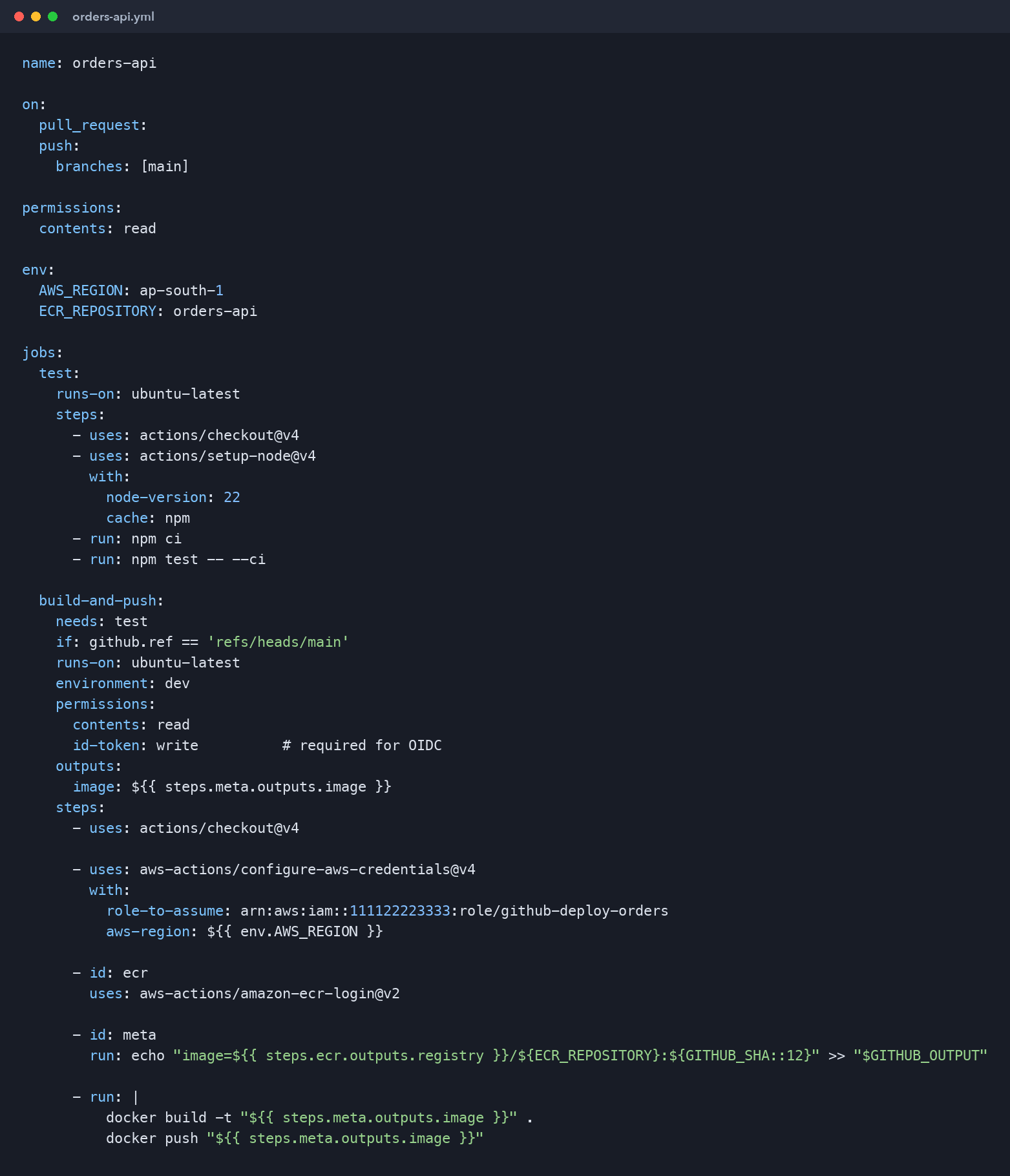
Here is the complete pipeline. Read it once, then we will walk through the important lines.
name: orders-api

on:
  pull_request:
  push:
    branches: [main]

permissions:
  contents: read

env:
  AWS_REGION: ap-south-1
  ECR_REPOSITORY: orders-api

jobs:
  test:
    runs-on: ubuntu-latest
    steps:
      - uses: actions/checkout@v4
      - uses: actions/setup-node@v4
        with:
          node-version: 22
          cache: npm
      - run: npm ci
      - run: npm test -- --ci

  build-and-push:
    needs: test
    if: github.ref == 'refs/heads/main'
    runs-on: ubuntu-latest
    environment: dev
    permissions:
      contents: read
      id-token: write          # required for OIDC
    outputs:
      image: ${{ steps.meta.outputs.image }}
    steps:
      - uses: actions/checkout@v4

      - uses: aws-actions/configure-aws-credentials@v4
        with:
          role-to-assume: arn:aws:iam::111122223333:role/github-deploy-orders
          aws-region: ${{ env.AWS_REGION }}

      - id: ecr
        uses: aws-actions/amazon-ecr-login@v2

      - id: meta
        run: echo "image=${{ steps.ecr.outputs.registry }}/${ECR_REPOSITORY}:${GITHUB_SHA::12}" >> "$GITHUB_OUTPUT"

      - run: |
          docker build -t "${{ steps.meta.outputs.image }}" .
          docker push "${{ steps.meta.outputs.image }}"
The lines that matter
permissions: id-token: write. This lets the job request an OIDC token from GitHub. Without it, configure-aws-credentials cannot authenticate and fails with an error about credentials. Grant it only on the job that needs AWS access, and keep the workflow default at contents: read.
role-to-assume. The action exchanges the GitHub token for temporary credentials of this role. The role's trust policy (from part two) only accepts tokens from this repository's main branch, so a pull request from a fork cannot reach AWS even if it modifies the workflow file.
needs: test and if: github.ref == 'refs/heads/main'. Images are built only after tests pass and only for code that has been reviewed and merged. Pull requests run the test job alone.
${GITHUB_SHA::12}. The image tag is the first twelve characters of the commit SHA, which gives every image an immutable link back to the exact source.
environment: dev. Associates the job with a GitHub environment. Later, the production deploy job uses environment: production with required reviewers, which gives you an approval gate for free.
Notice what is not in the file: no AWS_ACCESS_KEY_ID, no AWS_SECRET_ACCESS_KEY, no secrets at all. The role ARN is not sensitive; without a valid GitHub token from the right repository and branch, it is useless.
Making builds fast
A pipeline developers wait on is a pipeline developers work around. Three techniques keep build times low:
- Dependency caching —
actions/setup-nodewithcache: npm(and its equivalents for other languages) restores downloaded packages between runs. - Docker layer caching — order your
Dockerfileso that dependency installation happens before copying source code. Then a code change does not invalidate the dependency layer. Withdocker/build-push-actionyou can also cache layers in GitHub's cache withcache-from: type=gha. - Path filters — skip the pipeline when only documentation changes, using
paths-ignore: ['**.md']on the trigger.
Adding quality gates
Once the basic flow works, add gates in the test job rather than after the push:
- Lint and static analysis for the application.
hadolintfor the Dockerfile.- A vulnerability scan of the built image with a tool such as Trivy, failing the build on critical findings that have a fix available.
- Secret scanning, so leaked keys are blocked before they reach
main.
Fail fast and fail loud. A gate that only warns gets ignored within a week.
Concurrency and safety
Two merges in quick succession can start two runs that race each other to deploy. Add a concurrency group so runs on the same branch queue instead of overlapping:
concurrency:
  group: orders-api-${{ github.ref }}
  cancel-in-progress: false
For deployment jobs, cancel-in-progress: false is the safe choice; you do not want a deployment killed halfway through.
Pin third-party actions carefully. Official actions from GitHub and AWS pinned to a major version are a reasonable default; for less-known community actions, pin to a full commit SHA so a compromised tag cannot inject code into your pipeline.
Troubleshooting
- "Could not assume role with OIDC" / "Not authorized to perform sts:AssumeRoleWithWebIdentity" — check that
id-token: writeis set, the OIDC provider exists in the account, and the trust policy'ssubmatches the repository and branch exactly (it is case-sensitive). - "denied: User is not authorized to perform ecr:InitiateLayerUpload" — the role's permission policy does not cover the ECR actions on this repository ARN.
- "tag invalid: The image tag already exists" — immutability is working; you rebuilt the same commit. Re-run deploys with the existing image instead of rebuilding.
Key takeaways
- Split the pipeline into a
testjob for every change and a build job formainonly. - Authenticate with OIDC through
configure-aws-credentials; keep zero AWS keys in GitHub. - Tag images with the commit SHA, keep ECR tags immutable and scan on push.
- Cache dependencies and Docker layers, and add quality gates before the push.
What's next
We now have a tested image in ECR for every commit. In part seven we run it: Docker images on Amazon ECS with Fargate, behind an Application Load Balancer, and extend this workflow so every merge rolls out automatically.
Comments (0)
No comments yet — be the first to share your thoughts.