

A CI/CD pipeline is only as good as the Git workflow feeding it. If anyone can push straight to main, if releases are whatever happened to be on a branch last Tuesday, and if nobody can say which commit is running in production, no amount of AWS tooling will make deployments calm. This part sets up the Git foundation the pipeline in part six depends on.
What the pipeline needs from Git
Before choosing a branching model, be clear about what automation needs:
- A single source of truth for releasable code, almost always
main. - Every change reviewed and tested before it reaches that branch.
- A way to identify exactly which code is deployed, down to the commit.
- A cheap way to roll back, which really means redeploying a previous known-good version.
Every branching strategy is a different trade-off for delivering those four things.
Choosing a branching strategy
Three models dominate. For teams deploying to AWS continuously, the first is the usual recommendation.
Trunk-based development. Everyone works on short-lived feature branches (hours to a couple of days) and merges into main through pull requests. main is always deployable; incomplete features hide behind feature flags. This model fits CI/CD best because there is one path to production and integration problems surface immediately.
GitHub flow. Essentially trunk-based development with an explicit pull-request step and deployment from main. For most teams the two are the same thing in practice.
GitFlow. Long-lived develop, release and hotfix branches. It suits products with scheduled, versioned releases such as installed software or mobile apps, but it slows down web services that could ship many times a day, and long-lived branches produce painful merges.
If you have no strong reason to choose otherwise, start with trunk-based development and short-lived branches.
Protecting main
The rules that make main trustworthy are configured in the repository settings, not left to good intentions. On GitHub, use branch protection rules or rulesets on main:
- Require a pull request before merging, with at least one approving review.
- Require status checks to pass: build, unit tests, lint, and
terraform planfor infrastructure repositories. - Require branches to be up to date before merging, so checks ran against the latest
main. - Block force pushes and deletion of
main. - Require signed commits if your organisation needs a strong audit trail.
Add a CODEOWNERS file so changes to sensitive paths automatically request the right reviewers:
/infra/           @your-org/platform-team
/.github/workflows/ @your-org/platform-team
Pipeline definitions deserve the same protection as infrastructure code. Whoever can edit a workflow file can make it do anything its deploy role allows.
Commit messages that machines can read
A consistent commit format turns history into something your pipeline can use. Conventional Commits is the common choice:
feat(orders): add pagination to order history endpoint
fix(auth): refresh token no longer expires early
chore(deps): bump base image to latest patch release
Tools can derive the next semantic version from these prefixes (feat means a minor bump, fix a patch, a BREAKING CHANGE footer a major) and generate release notes automatically. Even without automation, readable history makes incident investigation far faster.
Versioning what you deploy
"Latest" is not a version. Every artifact the pipeline produces should carry an immutable identifier that traces back to Git. The simplest reliable scheme for container images is to tag with the commit SHA:
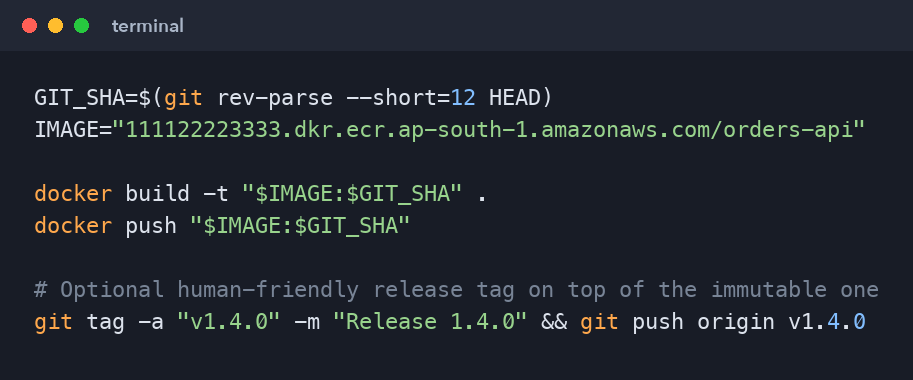
GIT_SHA=$(git rev-parse --short=12 HEAD)
IMAGE="111122223333.dkr.ecr.ap-south-1.amazonaws.com/orders-api"

docker build -t "$IMAGE:$GIT_SHA" .
docker push "$IMAGE:$GIT_SHA"

# Optional human-friendly release tag on top of the immutable one
git tag -a "v1.4.0" -m "Release 1.4.0" && git push origin v1.4.0
With SHA tags, the question "what is running in production?" has a precise answer, and rolling back means redeploying the previous SHA. Turn on tag immutability in the ECR repository so a tag can never be overwritten to point at different code.
Pull requests as the quality gate
A good pull-request pipeline is fast and strict. Aim for checks that finish in a few minutes:
- Build the application and the container image.
- Unit tests with a coverage report.
- Static analysis and linting, including
hadolintfor Dockerfiles andtflintfor Terraform. - Security scanning: dependency vulnerabilities and secret detection (to catch the access key someone pasted into a config file).
- Infrastructure plan for changes under
infra/, posted as a PR comment.
Keep slow suites (full end-to-end tests, load tests) for after merge, running against a staging environment. A pull request that takes forty minutes to validate pushes people toward bigger, riskier batches.
Environments and promotion
The trunk-based pattern pairs naturally with promotion: build once, deploy the same artifact through environments.
- A merge to
mainbuilds imageorders-api:3f9c2a1b7d4eand deploys it to dev automatically. - After tests pass in dev, the same image is promoted to staging.
- After approval, the same image goes to production.
Never rebuild for production. Rebuilding means production runs an artifact that was never tested, even if the source is identical. GitHub environments with required reviewers give you the approval gate before production without inventing your own process.
Handling hotfixes
With trunk-based development, a hotfix is just a small, fast pull request into main, reviewed and deployed through the normal pipeline. Resist the urge to patch production directly or to deploy from a laptop "just this once". If your normal pipeline is too slow for an emergency, fix the pipeline; that speed is valuable every day, not only during incidents.
If you must ship a fix while main contains unreleased work that is not ready, branch from the release tag currently in production, apply the fix, deploy that, and then merge the fix back into main immediately.
Monorepo or polyrepo
Teams often ask whether infrastructure and application code should live together. Both work:
- Monorepo: one place to review a change that touches both the app and its infrastructure. Use path filters so app changes do not trigger infrastructure plans and vice versa.
- Separate repositories: clearer ownership and permissions, with the platform team owning infrastructure and product teams owning services.
For a single service learning project, a monorepo with app/ and infra/ folders is the simplest choice, and it is what this series uses.
Key takeaways
- Favour trunk-based development with short-lived branches and a protected
main. - Enforce reviews and passing checks with branch protection, and guard workflow files with
CODEOWNERS. - Tag every artifact with the commit SHA and make ECR tags immutable.
- Build once and promote the same artifact through dev, staging and production.
What's next
With a disciplined Git workflow in place, part six builds the pipeline itself: a GitHub Actions workflow that tests the code, builds the image, authenticates to AWS through OIDC and pushes to ECR, with no stored AWS credentials anywhere.
Comments (0)
No comments yet — be the first to share your thoughts.