

Over nine parts we built identity, networking, infrastructure as code, a Git workflow, a CI pipeline, container platforms on ECS and EKS, and observability. A system can have all of these and still not be ready for production. Production readiness is about the uncomfortable questions: what happens when a secret leaks, when a release is bad, when an AZ fails, when the database is deleted, and when the bill doubles. This final part answers them and ends with a checklist you can run before any go-live.
Secrets: never in Git, never in images
Database passwords, API keys and signing secrets need a home that is encrypted, access-controlled, audited and rotatable. On AWS there are two options:
- AWS Secrets Manager — designed for secrets, with built-in automatic rotation for RDS and other databases. It has a small monthly cost per secret.
- SSM Parameter Store (SecureString) — encrypted parameters with a free standard tier; good for configuration and simpler secrets without rotation.
Both encrypt with KMS keys, and access is controlled by IAM, so the task role from part seven can read exactly the secrets the service needs and nothing else.
The delivery path matters as much as storage. Inject secrets at runtime, as we did with the secrets block in the ECS task definition, rather than baking them into images or passing them as plain environment variables in Terraform. On EKS, the Secrets Store CSI Driver with the AWS provider mounts secrets from Secrets Manager into pods.
Finally, assume a secret will leak one day and make rotation routine. If rotating a database password requires a deployment and a nervous afternoon, it will never happen.
Zero-downtime releases
ECS rolling updates (part seven) already avoid downtime for most changes. For higher-risk services, blue/green deployment goes further: the new version (green) is started alongside the old one (blue), tested, then traffic shifts over, and the old version stays available for instant rollback.
On ECS, blue/green is available as a native deployment strategy of the service, with traffic shifted between two ALB target groups. You can shift all at once, or use canary (a small percentage first, then the rest) or linear (equal steps over time) shifting. Lifecycle hooks let you run checks, such as a Lambda function that calls the new version's endpoints, before production traffic arrives. The same strategies are available through AWS CodeDeploy, and on EKS through progressive delivery tools such as Argo Rollouts.
Automatic rollback
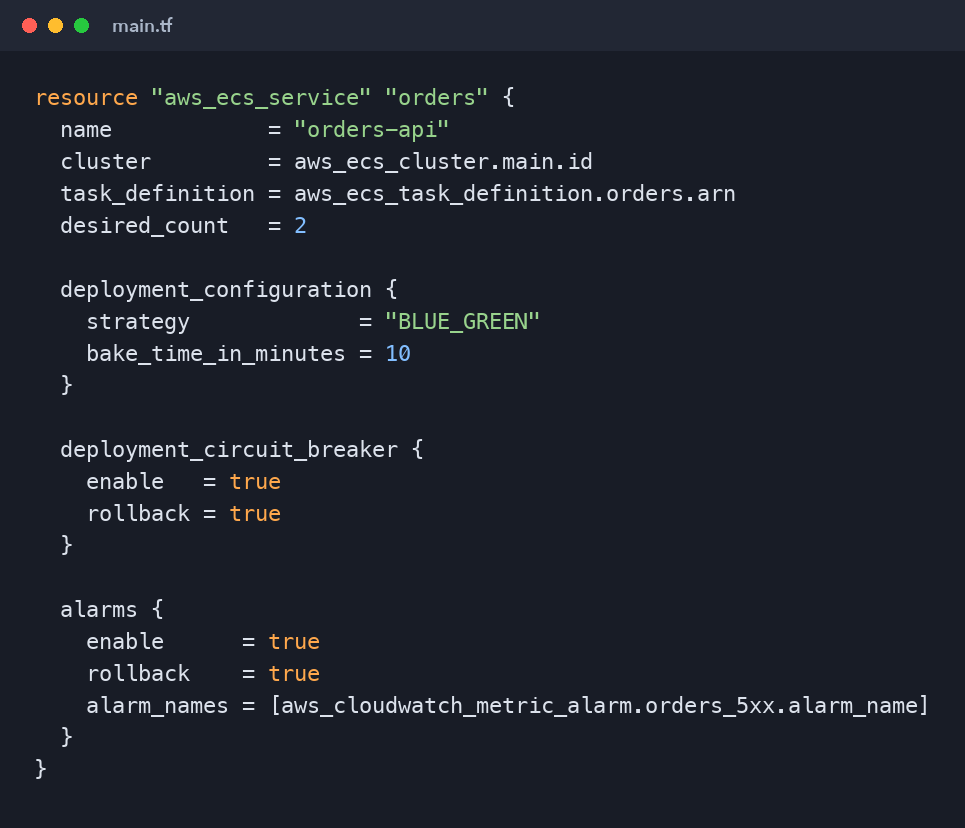
A fast rollback is worth more than a perfect test suite. Combine the deployment with the alarms from part nine so a bad release undoes itself:
resource "aws_ecs_service" "orders" {
  name            = "orders-api"
  cluster         = aws_ecs_cluster.main.id
  task_definition = aws_ecs_task_definition.orders.arn
  desired_count   = 2

  deployment_configuration {
    strategy             = "BLUE_GREEN"
    bake_time_in_minutes = 10
  }

  deployment_circuit_breaker {
    enable   = true
    rollback = true
  }

  alarms {
    enable      = true
    rollback    = true
    alarm_names = [aws_cloudwatch_metric_alarm.orders_5xx.alarm_name]
  }
}
The circuit breaker catches releases that cannot start. The alarm-based rollback catches releases that start fine but misbehave under real traffic. The bake time keeps the old version ready for a period after traffic shifts, so a rollback is a traffic switch rather than a fresh deployment. Exact argument names evolve with the AWS provider, so confirm them against the provider version you pin.
Rollback covers code, not data. Make database migrations backward-compatible (expand, then contract): add a new column, deploy code that writes both old and new, migrate, and only remove the old column in a later release. Then rolling back the application never meets a schema it cannot read.
Resilience: designing for failure
Assume components fail and design so users do not notice:
- Run across at least two AZs for every tier: ALB, tasks or pods, and the database (RDS Multi-AZ).
- Keep a minimum task count of two or more, so a single task failure or deployment never drops capacity to zero.
- Set timeouts and retries with backoff on every outbound call, and avoid retry storms that amplify an outage.
- Use health checks honestly: a
/healthendpoint should reflect whether the instance can serve requests, without failing the whole fleet because one optional dependency is slow.
Backups and recovery
Backups you have never restored are a hope, not a plan. Decide two numbers with the business: the RPO (how much data you can afford to lose) and the RTO (how long you can be down). Then:
- Enable automated RDS backups with point-in-time recovery, and set a retention that meets your RPO.
- Use AWS Backup with a backup plan for databases, EFS and other stateful resources, copying to a second region or account for disaster recovery.
- Protect state: version the Terraform state bucket and keep deletion protection on production databases.
- Rehearse a restore on a schedule and time it. That number is your real RTO.
Cost control
Cost is a production concern; an unexpected bill can end a project as surely as an outage. Habits that keep spending predictable:
- Tag everything (
Project,Environment,Owner) and activate cost allocation tags, so you know who spends what. - Set AWS Budgets alerts per environment and enable Cost Anomaly Detection.
- Right-size tasks and nodes using Container Insights data; most services request far more CPU and memory than they use.
- Use Graviton (ARM) for Fargate and EC2 where your images support it; it is typically cheaper for the same work.
- Use Savings Plans for steady baseline compute and Spot for fault-tolerant workloads such as batch jobs and EKS nodes managed by Karpenter.
- Remember the usual leaks: idle load balancers, NAT data processing, unattached EBS volumes, old snapshots and log groups without retention.
The go-live checklist
Run this before any service takes real traffic:
Security
- No long-lived access keys; humans use Identity Center, workloads and CI use roles.
- All secrets in Secrets Manager or Parameter Store, injected at runtime.
- Workloads in private subnets; only the ALB is public, with HTTPS and a valid certificate.
- Image scanning enabled and critical vulnerabilities fixed.
Delivery
- Every change goes through a reviewed pull request and the pipeline.
- Images tagged with the commit SHA; tags immutable.
- Circuit breaker and alarm-based rollback enabled.
- Database migrations are backward-compatible.
Operations
- Structured logs with retention; dashboards for the golden signals.
- Alarms on error rate and latency route to a person who will act.
- At least two AZs and two tasks; autoscaling configured.
- Backups automated and a restore rehearsed.
- Budgets and cost anomaly alerts in place.
Where to go from here
You now have the full path: an account set up safely, least-privilege IAM, a well-designed VPC, Terraform for everything, a disciplined Git workflow, a keyless GitHub Actions pipeline, containers on ECS and EKS, real observability, and a release process that protects users when things go wrong.
The best next step is to build it end to end yourself, break it on purpose and fix it: delete a task, push a failing release, revoke a permission and watch what happens. Then look at the AWS Certified DevOps Engineer – Professional exam guide; you will find most of its domains already covered by what you have built here.
Thank you for following the series. Ship small, ship often, and always know how to get back.
Comments (0)
No comments yet — be the first to share your thoughts.