

Clicking through the AWS console is a fine way to learn what a VPC or a load balancer is. It is a terrible way to run production. Nobody can review a click, nobody can recreate it exactly, and six months later nobody remembers why a security group allows port 9200. Infrastructure as Code (IaC) fixes all three problems by describing your infrastructure in files that live in Git.
This part introduces Terraform, the most widely used IaC tool for AWS, and uses it to build the network from part three. By the end you will understand state, plans, modules and the workflow teams use to change infrastructure safely.
Why Terraform
AWS has its own IaC service, CloudFormation, and it is perfectly capable. Terraform dominates job descriptions for a few practical reasons:
- One language (HCL) works across AWS, Azure, GCP, GitHub, Cloudflare, Datadog and hundreds of other providers.
terraform planshows a precise diff of what will change before anything changes.- A huge public registry of community modules saves you from writing common patterns from scratch.
Learn Terraform first, and CloudFormation (or the CDK) will feel familiar when a team uses it.
The core concepts
Terraform has five ideas you need before writing code.
- Provider — a plugin that knows how to talk to an API. The
awsprovider turns HCL into AWS API calls. - Resource — one thing Terraform manages, such as
aws_vpcoraws_security_group. - Data source — something Terraform reads but does not manage, such as the list of available AZs.
- Variables and outputs — inputs that make code reusable, and values exported for other code to use.
- State — Terraform's record of which real resources correspond to which blocks in your code.
State is the concept that trips people up, so it deserves its own section.
Understanding state
When you run terraform apply, Terraform creates resources and writes their IDs and attributes into a state file. Next time, it compares three things: your code, the state, and the real infrastructure. The difference becomes the plan.
Two rules follow from this:
- Never keep state on a laptop for shared infrastructure. If two people apply from two local state files, Terraform loses track and may try to recreate resources.
- Never commit state to Git. It can contain secrets in plain text.
The standard AWS answer is a remote backend: state stored in an S3 bucket with versioning and encryption, and locking so two applies cannot run at the same time. Recent Terraform versions support native S3 locking with use_lockfile, so a separate DynamoDB table is no longer required.
terraform {
  required_version = ">= 1.10"
  required_providers {
    aws = { source = "hashicorp/aws", version = "~> 6.0" }
  }
  backend "s3" {
    bucket       = "acme-terraform-state"
    key          = "network/prod/terraform.tfstate"
    region       = "ap-south-1"
    encrypt      = true
    use_lockfile = true
  }
}
Create the state bucket once (by hand or with a tiny bootstrap configuration), enable versioning on it, and block all public access. Versioning lets you recover if state is ever corrupted.
Building the VPC
You could write every subnet, route table and gateway by hand, and doing it once is a great exercise. In real projects most teams use the well-maintained community VPC module, which encodes years of best practice:
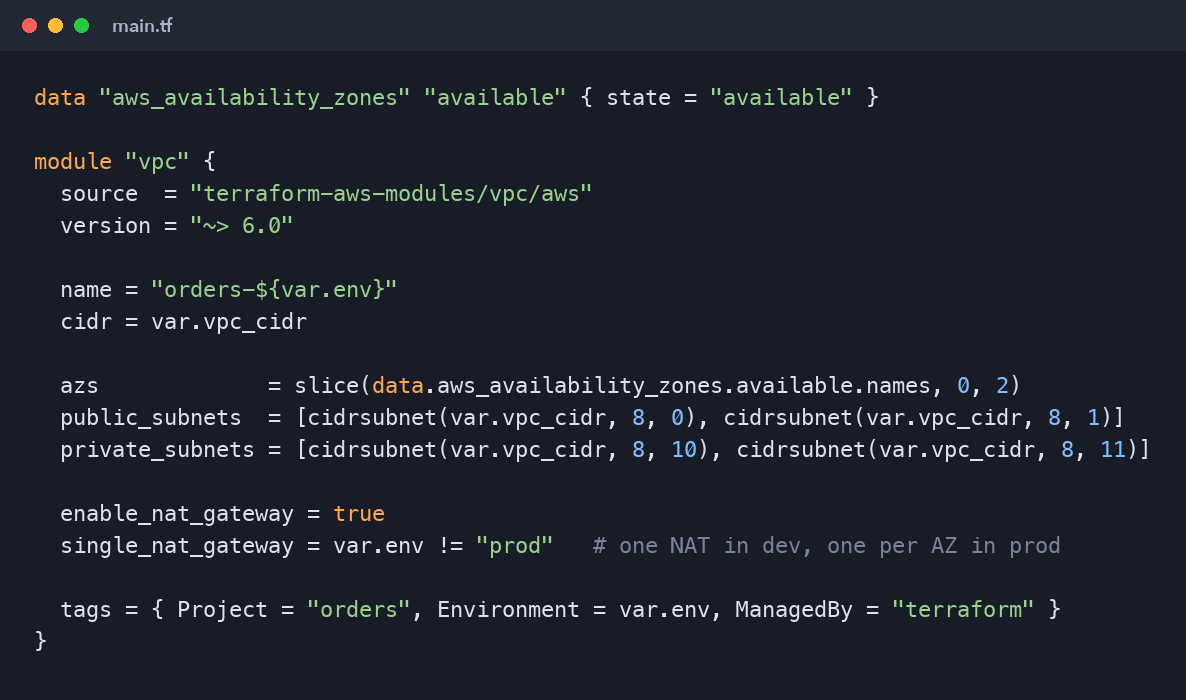
data "aws_availability_zones" "available" { state = "available" }

module "vpc" {
  source  = "terraform-aws-modules/vpc/aws"
  version = "~> 6.0"

  name = "orders-${var.env}"
  cidr = var.vpc_cidr

  azs             = slice(data.aws_availability_zones.available.names, 0, 2)
  public_subnets  = [cidrsubnet(var.vpc_cidr, 8, 0), cidrsubnet(var.vpc_cidr, 8, 1)]
  private_subnets = [cidrsubnet(var.vpc_cidr, 8, 10), cidrsubnet(var.vpc_cidr, 8, 11)]

  enable_nat_gateway = true
  single_nat_gateway = var.env != "prod"   # one NAT in dev, one per AZ in prod

  tags = { Project = "orders", Environment = var.env, ManagedBy = "terraform" }
}
A few details are worth noticing:
cidrsubnetcalculates subnet ranges from the VPC range, so changingvpc_cidrre-derives everything consistently.single_nat_gatewaykeeps dev cheap while prod stays highly available, with one variable controlling the difference.- Tags on every resource make cost reports and cleanup far easier.
ManagedBy = "terraform"warns colleagues not to edit the resource by hand.
Pin module and provider versions. An unpinned module can change behaviour under you on the next init.
Variables per environment
The same code should build dev, staging and prod with different inputs. Put the inputs in per-environment variable files:
# envs/prod.tfvars
env      = "prod"
vpc_cidr = "10.30.0.0/16"
Each environment also needs its own state key (or its own backend configuration), so destroying dev can never touch prod. Many teams go one step further and give each environment its own directory and AWS account.
The everyday workflow
Changing infrastructure follows the same loop every time:
terraform fmt -recursive          # consistent formatting
terraform init                    # download providers, connect backend
terraform validate                # catch syntax and type errors
terraform plan -var-file=envs/dev.tfvars -out=tfplan
terraform apply tfplan            # apply exactly what was reviewed
Saving the plan to a file and applying that file guarantees that what gets applied is exactly what someone reviewed. In a team, this loop runs in CI: a pull request triggers plan and posts the diff as a comment; merging to main triggers apply.
Read every plan. The line to watch for is must be replaced. Some attribute changes (a database's subnet group, an instance type in some cases) force Terraform to destroy and recreate a resource. On a stateless load balancer that is fine; on a production database it is an outage. Plans exist so you catch that before it happens.
Modules: your own building blocks
Once you have written a pattern twice, turn it into a module: a folder with variables.tf, main.tf and outputs.tf. A typical layout for our project:
infra/
  modules/
    network/       # wraps the VPC module plus security groups
    ecs-service/   # task definition, service, target group, alarms
  envs/
    dev/main.tf
    prod/main.tf
Each environment's main.tf calls the modules with its own variables. Outputs connect them: the network module outputs private subnet IDs, which the ECS module takes as input.
Drift and importing existing resources
Drift happens when someone changes infrastructure outside Terraform. The next plan shows Terraform wanting to "fix" it back. Treat drift as a process problem: either bring the change into code or revert it, and restrict console write access in production so drift cannot happen.
If you inherit resources created by hand, you do not need to recreate them. Terraform's import block brings an existing resource under management:
import {
  to = aws_s3_bucket.assets
  id = "orders-prod-assets"
}
Run a plan, adjust the resource block until the plan shows no changes, then apply.
Common mistakes
- Hard-coding account IDs, regions and ARNs instead of using variables and data sources.
- Running
applyfrom a laptop against production instead of through a reviewed pipeline. - Storing secrets in
.tfvarsfiles in Git. Read them from Secrets Manager or SSM Parameter Store instead. - One giant state file for everything. Split by layer (network, data, services) so a mistake has a small blast radius and plans stay fast.
Key takeaways
- Terraform compares code, state and reality to produce a plan you review before applying.
- Keep state remote in a versioned, encrypted S3 bucket with locking.
- Pin provider and module versions, and use per-environment variables and state.
- Read every plan, especially anything marked for replacement.
What's next
Our infrastructure is code; now our application needs a pipeline. Part five covers Git workflows for CI/CD: branching strategies, pull-request checks and versioning, the foundation the GitHub Actions pipeline in part six builds on.
Comments (0)
No comments yet — be the first to share your thoughts.