

Applications on AWS do not float in "the cloud". They run inside a network you design: the Virtual Private Cloud (VPC). Most deployment problems that look like application bugs, such as timeouts, a container that cannot pull its image, or a database that refuses connections, turn out to be network design issues. A DevOps engineer who can read a VPC diagram and spot the missing route is worth a lot.
This part designs a production-style VPC for the application we will deploy later in the series, and explains every component so you can debug it confidently.
The building blocks
A VPC is a private, isolated network in one region with an IP range you choose. Inside it:
- Subnets carve the VPC range into smaller ranges, each in a single Availability Zone (AZ).
- Route tables decide where traffic from a subnet goes.
- An Internet Gateway (IGW) connects the VPC to the internet.
- A NAT Gateway lets resources in private subnets make outbound internet calls without being reachable from the internet.
- Security groups are stateful firewalls attached to individual resources.
- Network ACLs are stateless firewalls attached to subnets.
What makes a subnet "public" or "private" is not a checkbox. It is purely its route table: a subnet whose route table sends 0.0.0.0/0 to an Internet Gateway is public. Everything else is private.
Choosing the CIDR range
Pick the VPC range carefully, because changing it later is painful. Use a private range from RFC 1918 and size it generously:
10.0.0.0/16gives you 65,536 addresses, plenty for one environment.- Use different, non-overlapping ranges per environment and account (
10.10.0.0/16for dev,10.20.0.0/16for staging,10.30.0.0/16for prod). If you ever need to peer VPCs or connect to an office network, overlapping ranges make it impossible.
Containers on ECS with the awsvpc network mode and pods on EKS each take a real IP from the subnet. Clusters chew through addresses faster than you expect, so size subnets with room to grow.
The standard three-tier layout
The layout below is the default for most web applications, and it is the one we will build with Terraform in part four:
| Tier | Subnets | What lives here | Route for 0.0.0.0/0 |
|---|---|---|---|
| Public | 2 (one per AZ) | Application Load Balancer, NAT Gateway | Internet Gateway |
| Private app | 2 | ECS tasks, EKS nodes, EC2 app servers | NAT Gateway |
| Private data | 2 | RDS, ElastiCache | none (local only) |
Two AZs is the minimum for high availability: if one AZ has an outage, the load balancer keeps sending traffic to the healthy one. Load balancers and RDS Multi-AZ actually require subnets in at least two AZs.
The key idea is that nothing except the load balancer is directly reachable from the internet. Your containers live in private subnets and receive traffic only through the load balancer. They reach out to the internet (to pull images, call APIs or download packages) through the NAT Gateway, which hides them behind its public IP.
Security groups: the firewall you will touch daily
Security groups are where most of your day-to-day network work happens. Their behaviour is worth understanding precisely:
- They are stateful: if inbound traffic is allowed, the response is automatically allowed out, and vice versa.
- They contain only allow rules. There is no deny; anything not allowed is blocked.
- A rule can reference another security group as its source instead of an IP range. This is the feature that makes AWS networking elegant.
Instead of saying "allow port 8080 from 10.0.1.0/24", you say "allow port 8080 from anything in the load-balancer security group". When tasks scale up or IPs change, the rule keeps working without edits.
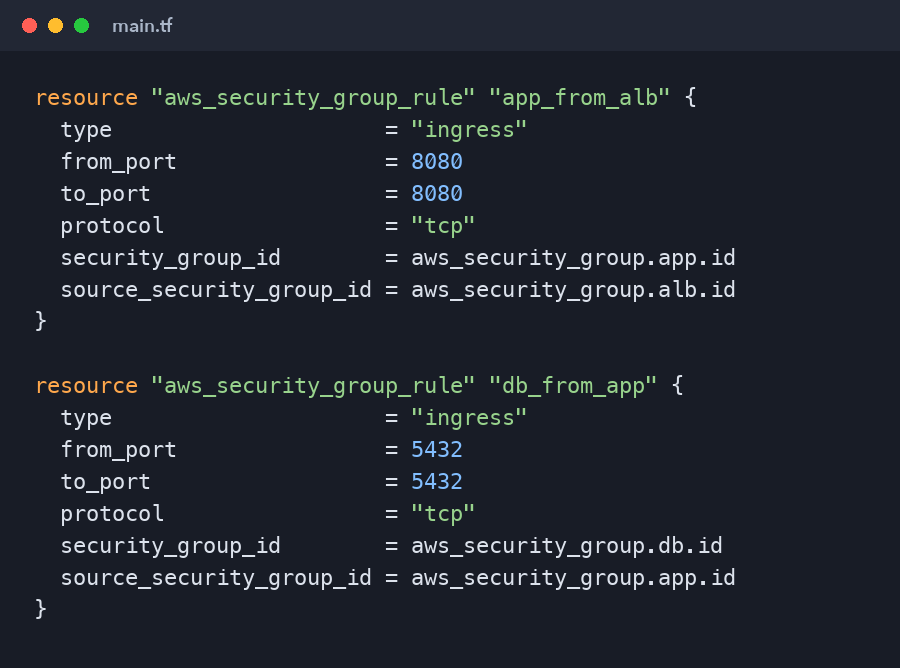
resource "aws_security_group_rule" "app_from_alb" {
  type                     = "ingress"
  from_port                = 8080
  to_port                  = 8080
  protocol                 = "tcp"
  security_group_id        = aws_security_group.app.id
  source_security_group_id = aws_security_group.alb.id
}

resource "aws_security_group_rule" "db_from_app" {
  type                     = "ingress"
  from_port                = 5432
  to_port                  = 5432
  protocol                 = "tcp"
  security_group_id        = aws_security_group.db.id
  source_security_group_id = aws_security_group.app.id
}
Read the chain: the internet reaches the load balancer on 443, the load balancer reaches the app on 8080, and the app reaches the database on 5432. The database cannot be reached from anywhere else, not even from another server in the same VPC.
Network ACLs: usually leave them alone
Network ACLs act at the subnet boundary, are stateless (you must allow return traffic on ephemeral ports explicitly) and are evaluated in rule-number order. The default NACL allows everything, and for most teams that is the right setting. Use security groups for application rules and reserve NACLs for broad, rarely changing blocks such as denying a known malicious IP range at the subnet level.
NAT Gateway costs and how to reduce them
The NAT Gateway is the line item that surprises every beginner. You pay per hour for each NAT Gateway and per gigabyte of data it processes. One NAT per AZ is the highly available design, but it doubles the hourly charge.
Ways to keep it under control:
- In dev and learning environments, use a single NAT Gateway.
- Add VPC gateway endpoints for S3 and DynamoDB. They are free and keep that traffic off the NAT entirely.
- Add interface endpoints for ECR, CloudWatch Logs and Secrets Manager if your containers pull large images or ship lots of logs. Endpoints cost money too, so compare against your NAT data volume.
- Tear down learning environments when you finish each session.
Debugging connectivity
When something cannot connect, walk the path hop by hop instead of guessing:
- DNS — does the name resolve, and to a private or a public IP?
- Route table — does the source subnet have a route to the destination (IGW, NAT, local, peering)?
- Security group outbound on the source — is the traffic allowed out?
- Network ACL on both subnets — is anything blocking, including return traffic?
- Security group inbound on the destination — is the source allowed in on that port?
- The application — is it actually listening on that port and interface?
VPC Reachability Analyzer automates steps two to five: give it a source and destination and it tells you exactly which component blocks the path. VPC Flow Logs record accepted and rejected connections, which settles arguments about whether traffic ever arrived.
The classic beginner bug is an ECS task in a private subnet that fails with "CannotPullContainerError". Nine times out of ten the private route table has no route to a NAT Gateway, so the task cannot reach ECR.
Key takeaways
- A subnet is public only because its route table points at an Internet Gateway.
- Put only load balancers in public subnets; run workloads and data stores in private ones.
- Chain security groups by reference instead of hard-coding IP ranges.
- Plan non-overlapping CIDR ranges per environment from day one.
- Watch NAT Gateway costs and use endpoints for heavy AWS-service traffic.
What's next
Clicking all of this together in the console teaches you the concepts, but it is not how professionals build it. In part four we define this entire VPC, plus its security groups, in Terraform, so the network becomes reviewed, versioned code that you can recreate in minutes.
Comments (0)
No comments yet — be the first to share your thoughts.