

Once you can work with individual values and strings, the next leap is storing many values together. Python gives you four built-in collections — lists, tuples, sets, and dictionaries — and knowing which one to reach for is one of the biggest jumps in your productivity. This is the fourth part of our Python Fundamentals series, and it builds directly on the strings we covered last time.
By the end you will know how to create and change lists, why tuples are immutable, how sets make uniqueness and membership fast, and how dictionaries map keys to values. We finish with a real worked example: counting how often each word appears in a piece of text.
Lists: ordered and changeable
A list is an ordered, mutable sequence. You create one with square brackets, and you can put anything inside it — even a mix of types, though keeping types consistent is usually kinder to your future self.
fruits = ["apple", "banana", "cherry"]
print(fruits[0])      # apple  -> indexing starts at 0
print(fruits[-1])     # cherry -> negative counts from the end
print(fruits[1:3])    # ['banana', 'cherry'] -> a slice
Indexing and slicing work exactly like they did for strings in the previous post, because strings are sequences too. The important difference is that a list can be changed in place, whereas a string cannot — every "edit" to a string actually produces a new one. Lists give you a set of methods for growing, shrinking, and reordering the same object.
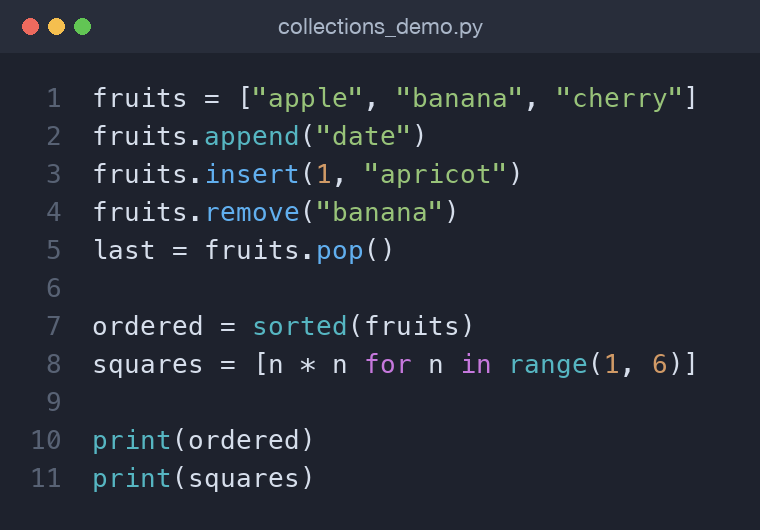
fruits.append("date")        # add to the end
fruits.insert(1, "apricot")  # add at a position
fruits.remove("banana")      # remove by value
last = fruits.pop()          # remove and return the last item
To reorder, sort() changes the list in place and returns None, while the built-in sorted() returns a new sorted list and leaves the original untouched. That distinction trips up a lot of beginners.
nums = [3, 1, 2]
ordered = sorted(nums)   # [1, 2, 3], nums unchanged
nums.sort(reverse=True)  # nums is now [3, 2, 1]
A quick list comprehension
When you want a new list built from an existing iterable, a comprehension is the idiomatic tool. It reads like the English "the square of n for each n in this range", and it is both shorter and faster than the equivalent for loop with append.
squares = [n * n for n in range(1, 6)]  # [1, 4, 9, 16, 25]
evens = [n for n in range(10) if n % 2 == 0]
The optional if clause at the end filters items out, so you can transform and select in a single readable line. Do not overdo it, though — if a comprehension grows two nested loops and a condition, a plain loop is usually clearer.
Tuples: ordered and fixed
A tuple looks like a list but uses parentheses and cannot be changed after creation. That immutability is a feature: it signals "these values belong together and should not shift", and it lets tuples be used as dictionary keys or set members.
point = (3, 4)
x, y = point          # unpacking into two variables
print(x, y)           # 3 4
Unpacking is the everyday reason tuples are so pleasant. Functions that return several values return a tuple, and you unpack it on the receiving end. You can even swap two variables in one line — a, b = b, a — because the right side builds a tuple first. Reach for a tuple when the collection has a fixed shape — a coordinate, an RGB colour, a database row — and for a list when the contents will grow or shrink. Because a tuple never changes, Python can hash it, which is exactly why tuples are allowed as dictionary keys and set members while lists are not.
Sets: unique and fast
A set stores unordered, unique values. Adding a duplicate simply does nothing, which makes sets perfect for de-duplication and for fast membership tests.
seen = {"a", "b", "a"}   # {'a', 'b'} -> duplicate dropped
seen.add("c")
print("b" in seen)        # True, and very fast
Sets also support the mathematical operations you would expect:
a = {1, 2, 3}
b = {3, 4, 5}
print(a | b)   # union -> {1, 2, 3, 4, 5}
print(a & b)   # intersection -> {3}
print(a - b)   # difference -> {1, 2}
Checking x in my_set is roughly constant time no matter how large the set is, whereas x in my_list scans item by item and slows down as the list grows. For a handful of items the difference is invisible, but across thousands or millions of lookups it is the gap between instant and sluggish. If you find yourself repeatedly asking "have I already seen this?", a set is almost always the answer. A common trick is list(set(items)) to strip duplicates from a list in a single expression — just remember it discards the original order.
Dictionaries: keys to values
A dictionary maps unique keys to values. It is the workhorse of Python — configuration, records, lookups, and counts all live in dictionaries. Since Python 3.7 they also remember the order in which you inserted keys, so iterating a dictionary is predictable.
person = {"name": "Ada", "role": "engineer"}
print(person["name"])          # Ada
print(person.get("age"))       # None -> no KeyError
print(person.get("age", 0))    # 0 -> supplied default
Use [] when you are certain the key exists and want a loud error if it does not; use .get() when a missing key is normal and you want a safe default. Adding and updating share the same syntax:
person["age"] = 36        # add a new key
person["role"] = "lead"   # update an existing one
person.update({"city": "London"})
To iterate over both keys and values, .items() is the clean way:
for key, value in person.items():
    print(f"{key}: {value}")
And just like lists, dictionaries have a comprehension form:
lengths = {w: len(w) for w in ["hi", "hello"]} # {'hi': 2, 'hello': 5}
Which one should I use?
- List — an ordered collection you will add to, remove from, or reorder.
- Tuple — a fixed group of related values, or anything you need as a dict key or set member.
- Set — you care only about membership and uniqueness, not order or position.
- Dictionary — you want to look values up by a meaningful key rather than a position.
Nesting collections
Real data is rarely flat, and these types nest freely. A list of dictionaries is the classic shape for "a table of records" — it is exactly what you get back when you parse JSON from a web API. A dictionary whose values are lists models one-to-many relationships neatly, such as a person mapped to their many skills.
team = [
    {"name": "Ada", "skills": ["python", "sql"]},
    {"name": "Ravi", "skills": ["python", "go"]},
]
print(team[0]["skills"][1])  # sql
Worked example: counting words
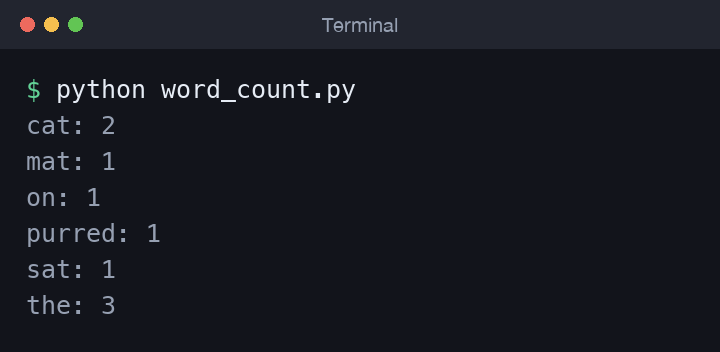
Let us tie it together by counting how often each word appears in a sentence. We lower-case the text and split it into a list, then walk that list building a dictionary of counts — using .get() with a default of 0 so the first sight of a word starts it at zero.
text = "the cat sat on the mat the cat purred"
counts = {}
for word in text.lower().split():
    counts[word] = counts.get(word, 0) + 1

for word, n in sorted(counts.items()):
    print(f"{word}: {n}")
Running it shows each unique word alongside its frequency — a genuinely useful pattern for log analysis, text processing, and quick data exploration. Notice how three collection types quietly cooperate here: split() gives us a list, the dictionary accumulates the counts, and sorting the .items() gives us tuples of key and value to unpack in the loop. Once this pattern clicks, you will spot dozens of everyday problems that are really just "group these things and count them".
Common mistakes
- Expecting
list.sort()to return the sorted list — it returnsNoneand sorts in place. Usesorted()if you want a new list. - Trying to change a tuple, or to put a list inside a set — both fail because set members and tuple immutability require hashable, unchangeable values.
- Using
dict[key]for a key that might be missing and getting aKeyError; reach for.get()with a default instead. - Forgetting that sets and dictionaries do not track insertion position for lookups — if order matters for indexing, use a list.
Wrapping up
You now have the four core collections and, more importantly, a feel for when each one earns its place: lists for sequences, tuples for fixed groups, sets for uniqueness, and dictionaries for key-based lookup. Practise by rewriting the word counter to ignore punctuation or to return only the top few words. Next in the series we turn to Control Flow in Python: Conditionals and Loops, where these collections become the things your programs iterate over and decide upon.
Comments (0)
No comments yet — be the first to share your thoughts.