

Once your programs grow past a few lines, copying and pasting the same logic everywhere becomes a liability. Functions let you name a block of work once and reuse it anywhere, which keeps code short, readable, and easy to fix. This is the sixth part of our Python Fundamentals series; having covered conditionals and loops in the previous post on control flow, we now package that logic into reusable functions.
Defining a function with def
You create a function with the def keyword, a name, a pair of parentheses for its inputs, and an indented body. Calling the function runs that body. Nothing happens until you call it.
def greet(name):
    print(f"Hello, {name}!")

greet("Ada")   # Hello, Ada!
greet("Linus") # Hello, Linus!
The name in the parentheses (name) is a parameter — a placeholder. The value you pass when calling ("Ada") is an argument. People use the words loosely, but that is the real distinction: parameters are defined, arguments are supplied.
Returning values
print shows something on screen; return hands a value back to the caller so the rest of your program can use it. A function without a return statement gives back None.
def square(n):
    return n * n

result = square(5)   # 25
total = square(2) + square(3)  # 4 + 9 = 13
Returning is far more flexible than printing, because the caller decides what to do with the result — store it, combine it, or display it. A function that only prints is a dead end: you can look at its output but you cannot feed it into the next calculation. Reach for return in almost every function you write, and leave the printing to the code that called you.
A return also ends the function immediately. Any lines after the one that runs are skipped, which is handy for guard clauses:
def safe_divide(a, b):
    if b == 0:
        return None      # bail out early
    return a / b
Returning multiple values
Python lets you return several values at once by separating them with commas, which packs them into a tuple. The caller can unpack them into separate names.
def min_max(numbers):
    return min(numbers), max(numbers)

low, high = min_max([4, 9, 1, 7])
print(low, high)  # 1 9
Default and keyword arguments
A parameter can have a default value, used when the caller omits it. This makes functions flexible without forcing every caller to supply every detail.
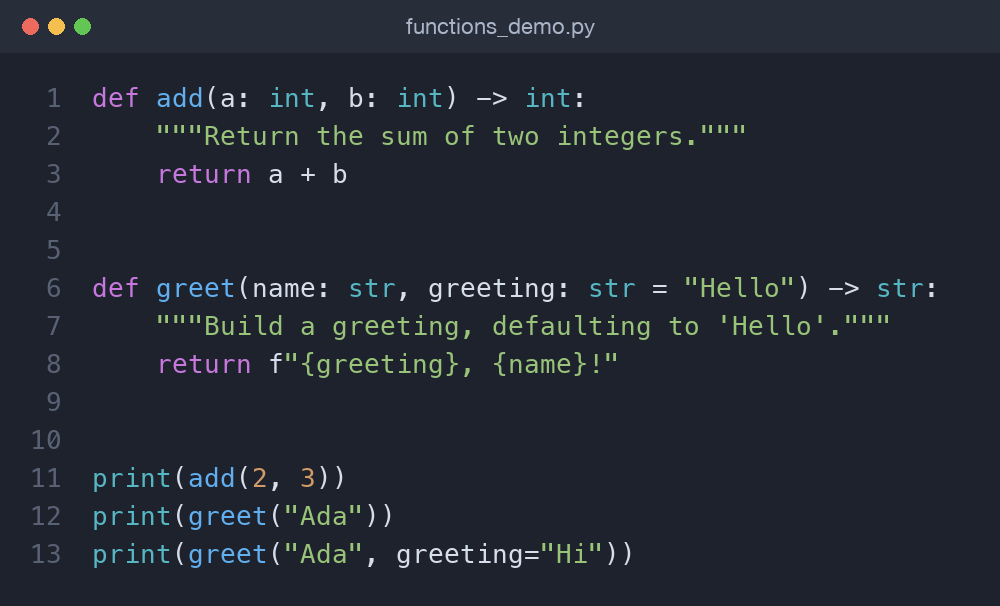
def greet(name, greeting="Hello"):
    return f"{greeting}, {name}!"

greet("Ada")                 # Hello, Ada!
greet("Ada", "Welcome")      # Welcome, Ada!
greet("Ada", greeting="Hi")  # Hi, Ada!
That last call uses a keyword argument — naming the parameter explicitly. Keyword arguments make calls self-documenting and let you skip over other defaults. A useful rule: pass by keyword whenever the meaning of a bare value would not be obvious at the call site.
Flexible arguments: *args and **kwargs
Sometimes you do not know how many arguments a caller will pass. *args collects extra positional arguments into a tuple, and **kwargs collects extra keyword arguments into a dictionary.
def total(*numbers):
    return sum(numbers)

total(1, 2, 3)        # 6
total(10, 20, 30, 40) # 100

def describe(**details):
    for key, value in details.items():
        print(f"{key}: {value}")

describe(name="Ada", role="engineer")
You will meet these constantly when reading library code. For now, just recognise them: a single * means "gather the rest of the positional values," and ** means "gather the rest of the named ones."
Docstrings and type hints
A docstring is a string literal just under the def line that explains what the function does. Type hints annotate parameters and the return value. Neither is enforced at runtime, but both make your intent obvious to readers and tools.
def add(a: int, b: int) -> int:
    """Return the sum of two integers."""
    return a + b
The a: int says a is expected to be an integer, and -> int describes the return type. Editors use these hints for autocompletion and warnings, tools like mypy can check them, and docstrings show up when you call help(add). Python will not stop you passing a string where an int is hinted — the annotations are documentation, not guardrails — but that documentation is exactly what makes a large codebase navigable. Adopt both early; your future self, and anyone reading your code, will thank you.
Local versus global scope
Names created inside a function are local — they exist only while the function runs and vanish afterward. This isolation is a feature: two functions can each use a variable called total without interfering.
def make_counter():
    count = 0          # local to this call
    return count + 1

count = 99             # a different, global name
print(make_counter())  # 1
print(count)           # 99
When you assign to a name inside a function, Python treats it as local unless you say otherwise. That is why the count = 99 at module level is untouched by make_counter. You can reach a module-level variable with the global keyword, but avoid it. Functions that quietly read and mutate global state are hard to test, hard to reuse, and hard to reason about, because their behaviour depends on invisible context. Prefer passing values in as arguments and handing results back with return — a function whose output depends only on its inputs is the goal, and it is exactly what makes the discount example below so easy to trust.
Worked example: a discount calculator
Let us refactor a tangled price calculation into small, pure functions — each one takes inputs, returns a result, and touches nothing outside itself.
def apply_discount(price: float, percent: float) -> float:
    """Return price after a percentage discount."""
    return price * (1 - percent / 100)

def add_tax(price: float, rate: float = 8.0) -> float:
    """Return price with tax added (default 8%)."""
    return price * (1 + rate / 100)

def final_price(price: float, percent: float) -> float:
    """Apply a discount, then tax, rounded to cents."""
    discounted = apply_discount(price, percent)
    return round(add_tax(discounted), 2)

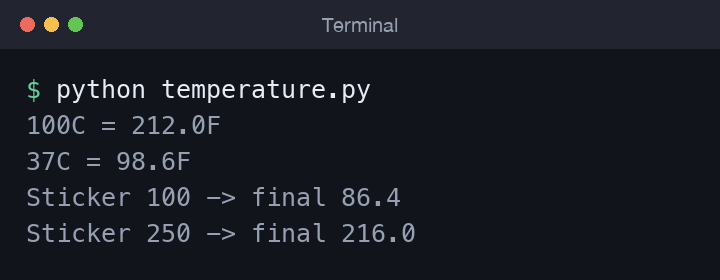
print(final_price(100, 20))  # 86.4
Each function does one thing and can be tested on its own. final_price reads like a sentence because the helpers are well named. This is the payoff of small, pure functions: the whole becomes easy to follow.
Lambda: tiny anonymous functions
A lambda is a one-line function with no name, handy where you need a quick throwaway. It is most common as an argument to functions like sorted.
people = [("Ada", 36), ("Linus", 21), ("Grace", 45)]
by_age = sorted(people, key=lambda person: person[1])
# [('Linus', 21), ('Ada', 36), ('Grace', 45)]
If a lambda grows beyond a simple expression, write a normal def instead — it is clearer and can carry a docstring.
Try it yourself
The best way to make these ideas stick is to build something small. Try each of these in a file and run it:
- Write
to_celsius(fahrenheit)andto_fahrenheit(celsius), then print a small table of conversions using a loop from the control flow post. - Give
add_taxa second call that overrides the default rate with a keyword argument, and confirm the result changes. - Write a
summarize(*numbers)function that returns the count, sum, and average as a tuple, then unpack it into three names. - Take a script you have already written and pull one repeated block out into a named function.
Common mistakes
- Confusing
printandreturn. A function that prints but returnsNonecannot be reused in a calculation. Return the value and print at the call site. - A mutable default argument. Never write
def f(items=[]); the list is shared across calls. Usedef f(items=None)and create a fresh list inside. - Relying on
global. If a function needs a value, pass it in. Hidden global state is the source of many subtle bugs. - Forgetting the parentheses.
squarerefers to the function itself;square(5)calls it.
Wrapping up
Functions turn repetition into reuse: def names a block of work, parameters accept inputs, return hands results back, and local scope keeps everything tidy. Lean on default and keyword arguments for flexibility, add docstrings and type hints for clarity, and keep each function small and pure. Next in the series we group related functions and data together with classes in Object-Oriented Programming in Python.
Comments (0)
No comments yet — be the first to share your thoughts.