

Programs get interesting the moment they can make decisions and repeat work. So far your code has run top to bottom, one line after another; control flow is what lets it branch, loop, and react to data. This is the fifth part of our Python Fundamentals series, and it ties together everything you've built — especially the collections from the previous post, which you'll now learn to iterate over.
By the end you'll be able to read and write conditionals, loops, and the small logic that powers real programs. We'll finish with two classics you can run yourself: FizzBuzz and a number-guessing game.
Making decisions with if / elif / else
The if statement runs a block only when a condition is true. Add elif (else-if) for extra branches and else for the fallback. Python checks each condition in order and runs the first block that matches.
score = 72

if score >= 90:
    grade = "A"
elif score >= 75:
    grade = "B"
elif score >= 60:
    grade = "C"
else:
    grade = "F"

print(grade)  # C
Notice there are no braces. The colon opens the block and the indentation is the block — every line indented under if belongs to it. This is not a style preference in Python; it is the syntax. Mixing tabs and spaces, or getting the indentation wrong, changes the meaning of your program or raises an IndentationError.
Only one branch ever runs. As soon as Python finds a true condition it executes that block and skips the rest, so order matters: put your most specific conditions first. If none of the conditions match and there is no else, the whole statement simply does nothing and execution continues below it.
Comparisons and boolean logic
Conditions are built from comparison operators: == (equal), != (not equal), <, <=, >, >=. Combine them with the boolean operators and, or, and not — spelled as words, not symbols.
age = 25
member = True

if age >= 18 and member:
    print("Full access")

if not member or age < 13:
    print("Restricted")
Python also lets you chain comparisons the way maths does: 0 <= hour < 24 reads naturally and means both parts must hold. Both and and or are short-circuiting — Python stops evaluating as soon as the result is decided, which is handy for guarding against errors like if items and items[0] == "x".
A useful detail: and and or don't just return True or False, they return one of the operands. "" or "default" evaluates to "default", and name or "guest" gives you a quick fallback value. That behaviour leans directly on truthiness, which is our next topic.
Truthiness: what counts as falsy
Conditions don't need to be literal True/False. Every Python value is either "truthy" or "falsy". The falsy values are few and worth memorising: False, None, 0 (and 0.0), and every empty collection — "", [], {}, (), set(). Everything else is truthy.
names = []

if names:
    print("We have names")
else:
    print("The list is empty")  # this runs
This is why idiomatic Python writes if names: instead of if len(names) > 0:. It's shorter and reads like plain English.
Looping with for and range()
A for loop walks through the items of any iterable. To repeat something a fixed number of times, loop over range(), which produces a sequence of integers.
for i in range(5):
    print(i)          # 0 1 2 3 4

for i in range(2, 11, 2):
    print(i)          # 2 4 6 8 10
range(stop) starts at 0; range(start, stop) sets the start; range(start, stop, step) sets the step. The stop value is always excluded — a source of many off-by-one bugs, so keep it in mind. A negative step counts downward, so range(10, 0, -1) gives you a countdown from 10 to 1.
range is also memory-efficient: it doesn't build a list of every number up front, it generates them one at a time as the loop asks. That means range(1_000_000) costs almost nothing until you actually iterate.
Iterating over collections
This is where post 4 pays off. You rarely need indexes in Python — you loop directly over the items. For lists, tuples, and sets you get each element; for dictionaries you get the keys, or use .items() for key-value pairs.
fruits = ["apple", "banana", "cherry"]

for fruit in fruits:
    print(fruit.upper())

for index, fruit in enumerate(fruits, start=1):
    print(index, fruit)          # 1 apple, 2 banana, ...

prices = {"apple": 0.5, "banana": 0.3}
for name, price in prices.items():
    print(f"{name}: ${price}")
Use enumerate() when you genuinely need a counter alongside the value — it's cleaner than managing a separate variable, and the start argument lets you count from 1 instead of 0. If you need to walk two sequences in step, zip() pairs them up: for name, age in zip(names, ages):. Reaching for range(len(items)) to index into a list is almost always a sign you've forgotten one of these tools.
while loops, break, and continue
A while loop repeats as long as its condition stays true. Use it when you don't know the number of iterations ahead of time. break exits the loop immediately; continue skips to the next iteration.
total = 0
number = 1

while number <= 100:
    if number % 3 == 0:
        number += 1
        continue          # skip multiples of 3
    if total > 50:
        break             # stop once we pass 50
    total += number
    number += 1
Always make sure the condition can eventually become false, or you'll write an infinite loop. If you want one, while True: with a break inside is the standard pattern — you'll see it in the guessing game below.
The loop else clause
Both for and while accept an optional else block that runs only if the loop finished without hitting a break. It's perfect for search-and-report logic.
for n in [4, 6, 8, 9]:
    if n % 2 == 1:
        print("Found an odd number")
        break
else:
    print("All even")   # runs only if no break happened
Nested loops and match
Loops can contain loops. A break only exits the innermost loop, so nested loops are common for grids, pairs, and tables.
for row in range(1, 4):
    for col in range(1, 4):
        print(row * col, end="\t")
    print()
Keep nesting shallow where you can — two or three levels deep is usually a sign to extract an inner loop into its own function, which is exactly what the next post covers.
Python 3.10 added the match statement for cleanly branching on a value's shape — a structured alternative to a long if/elif chain. The final case _: acts as a catch-all default, and match can do far more than compare literals — it can destructure tuples, lists, and objects — but the simple form below is enough to start:
match command:
    case "start":
        run()
    case "stop":
        halt()
    case _:
        print("Unknown")
Worked example: FizzBuzz
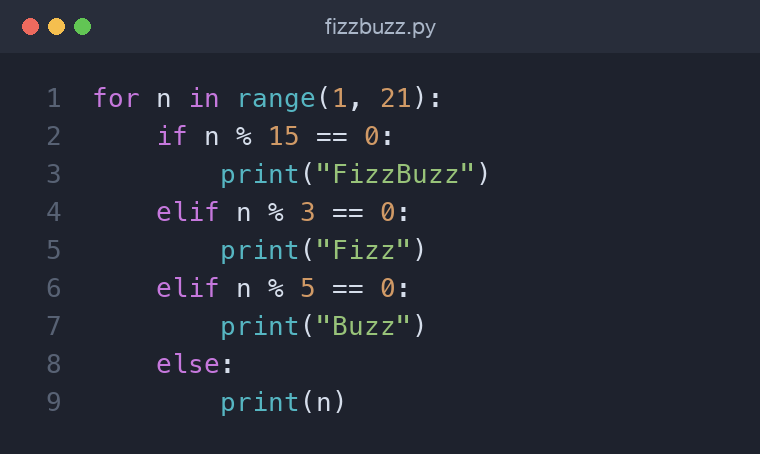
FizzBuzz prints numbers 1 to 20, but replaces multiples of 3 with "Fizz", multiples of 5 with "Buzz", and multiples of both with "FizzBuzz". It's a tidy showcase of range, the modulo operator %, and ordered conditionals — check the "both" case first.
for n in range(1, 21):
    if n % 15 == 0:
        print("FizzBuzz")
    elif n % 3 == 0:
        print("Fizz")
    elif n % 5 == 0:
        print("Buzz")
    else:
        print(n)
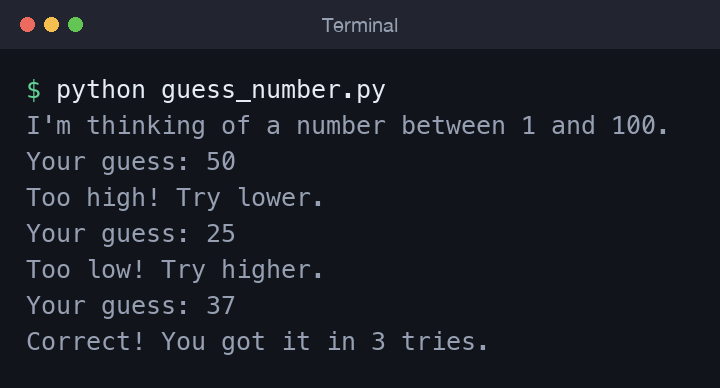
The number-guessing game in the repo uses while True, break, and comparisons to loop until the player wins. Here's a sample run:
Common mistakes
- Using
=instead of==. Assignment in a condition is a syntax error in Python (a small mercy), but mixing them up in logic still trips people up. - Forgetting the colon at the end of an
if,for, orwhileline. - Inconsistent indentation — pick spaces (four is standard) and never mix with tabs.
- Off-by-one with
range()— remember the stop value is excluded. - Modifying a list while looping over it, which skips elements. Iterate over a copy or build a new list instead.
Wrapping up
You can now steer a program with conditionals, repeat work with for and while, and control the flow precisely using break, continue, and the loop else. Indentation is the block delimiter, truthiness keeps conditions readable, and iteration ties directly back to the collections you learned earlier. Next up is Functions in Python: Arguments, Return Values, and Scope, where you'll package this logic into reusable, testable pieces.
Comments (0)
No comments yet — be the first to share your thoughts.