

Text is everywhere in real programs: names, file paths, log lines, user input, and API responses all arrive as strings. In the previous post we covered numbers, booleans, and Python's core types; here we focus on str, the type you'll reach for more than any other. This is the third part of our Python Fundamentals series, and by the end you'll be slicing, cleaning, searching, and formatting text with confidence.
Creating strings
A string is a sequence of characters wrapped in quotes. Python treats single and double quotes identically, so pick whichever avoids escaping:
single = 'She said hi'
double = "It's a nice day"   # double quotes so the apostrophe is fine
path = r"C:\Users\name"      # raw string: backslashes stay literal
The r prefix creates a raw string where backslashes are not treated as escape characters — handy for Windows paths and regular expressions.
Escape sequences
Inside normal strings, the backslash starts an escape sequence. The common ones are \n (newline), \t (tab), \" and \' (a quote), and \\ (a literal backslash).
print("Name:\tAda\nRole:\tEngineer")
Multiline strings
Triple quotes (""" or ''') let a string span several lines, keeping the line breaks you type. They're perfect for blocks of text and documentation:
message = """Dear Ada,
Thanks for signing up.
The Team"""
Indexing and slicing
Strings are ordered, so each character has an index starting at 0. Negative indexes count from the end, and slicing pulls out a substring with [start:stop], where stop is excluded.
word = "Python"
print(word[0])     # P
print(word[-1])    # n
print(word[0:3])   # Pyt
print(word[3:])    # hon
print(word[::-1])  # nohtyP  (reversed)
Strings are immutable
You cannot change a character in place — word[0] = "J" raises a TypeError. Instead, every "modifying" method returns a new string and leaves the original untouched. This matters: if you want the result, you must assign it.
name = "ada"
name.upper()          # returns "ADA" but is thrown away
name = name.upper()   # now name is "ADA"
Common string methods
Python ships dozens of built-in methods. These are the ones you'll use daily:
upper()/lower()— change casestrip()— remove leading/trailing whitespace (alsolstrip,rstrip)replace(old, new)— swap all occurrencessplit(sep)— break a string into a list;join()does the reversefind(sub)/index(sub)— locate a substring (findreturns-1if absent,indexraises)startswith()/endswith()— test the endscount(sub)— how many times a substring appears
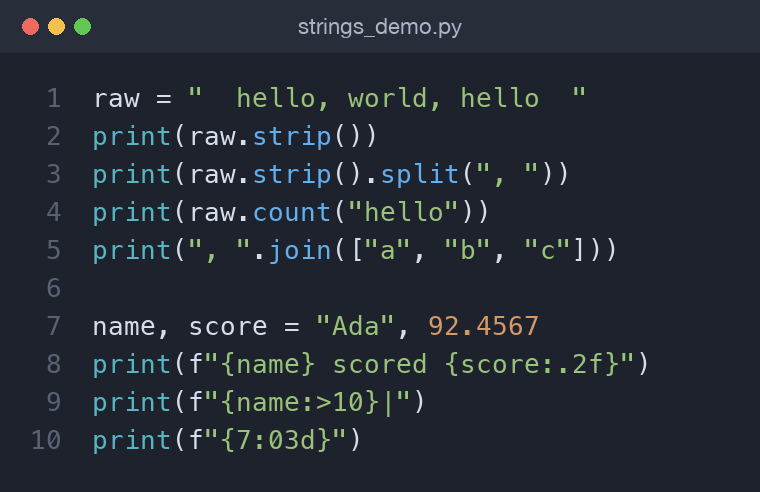
raw = "  hello, world, hello  "
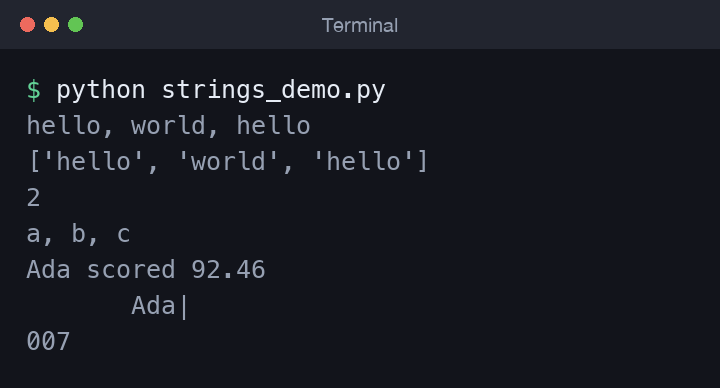
print(raw.strip())                 # "hello, world, hello"
print(raw.strip().split(", "))     # ['hello', 'world', 'hello']
print(raw.count("hello"))          # 2
print(", ".join(["a", "b", "c"]))  # "a, b, c"
Membership tests read like English with the in keyword, and len() returns the character count:
print("world" in raw)   # True
print(len("Python"))    # 6
More methods worth knowing
Once the daily methods feel natural, a second tier saves you from writing loops by hand. Case helpers and padding are the ones that show up most often:
print("ada lovelace".title())      # Ada Lovelace  (each word capitalised)
print("hello".capitalize())        # Hello         (only the first letter)
print("42".rjust(6, "0"))          # 000042        (pad on the left)
print("hi".ljust(6, "."))          # hi....        (pad on the right)
print("7".zfill(4))                # 0007          (zero-fill, sign-aware)
print("menu".center(10, "-"))      # ---menu---
splitlines() breaks multiline text on line boundaries without leaving empty trailing entries, and partition() splits exactly once into three parts — the piece before the separator, the separator itself, and the piece after:
log = "INFO: started\nWARN: slow\nERROR: crashed"
print(log.splitlines())            # ['INFO: started', 'WARN: slow', 'ERROR: crashed']

level, sep, text = "ERROR: crashed".partition(": ")
print(level)                       # ERROR
print(text)                        # crashed
Unlike split(": ", 1), partition() always returns three values, so unpacking never fails even when the separator is absent — the two trailing parts simply come back empty.
Checking what a string contains
When you validate user input, the is... family answers yes/no questions about the characters in a string. Each returns False for the empty string:
print("2026".isdigit())    # True
print("Ada".isalpha())     # True
print("   ".isspace())     # True
print("a1".isalnum())      # True
print("hello world".isalpha())  # False  (the space is not a letter)
These are safer than a bare int(text) when you are not yet sure the input is numeric — check isdigit() first, then convert.
Combining strings
You join strings with + (concatenation) and repeat them with *:
greeting = "Hi " + "Ada"
line = "-" * 20        # a 20-character divider
Concatenating in a loop with + is fine for a few pieces, but for many parts prefer building a list and calling join() — it's faster and cleaner.
Formatting with f-strings
The modern way to build text is the f-string: prefix the literal with f and drop expressions inside {}. You can also add a format specifier after a colon to control width, alignment, and decimals.
name, score = "Ada", 92.4567
print(f"{name} scored {score:.2f}")   # Ada scored 92.46
print(f"{name:>10}|")                 # right-align in 10 cols
print(f"{name:<10}|")                 # left-align
print(f"{7:03d}")                     # 007  (zero-padded)
.2f keeps two decimals, >10 right-aligns within ten characters, and 03d pads an integer with leading zeros. These specifiers are what turn ragged output into a tidy report.
Numbers, separators, and debugging
Format specifiers go well beyond decimals. A comma (or underscore) inserts thousands separators, a percent sign scales and labels a ratio, and you can combine width with alignment in a single spec:
total = 1234567.891
print(f"{total:,.2f}")      # 1,234,567.89
print(f"{total:_.0f}")      # 1_234_568
print(f"{0.256:.1%}")       # 25.6%
print(f"{255:#x}")          # 0xff  (hex with prefix)
print(f"{42:^8}|")          # center in 8 columns:   42   |
You can also center-align with ^, and choose the padding character by placing it before the alignment flag, as in f"{name:*^12}". Two shortcuts are especially handy while debugging. The !r conversion prints the repr() of a value — showing quotes around strings so you can spot stray whitespace — and the = suffix prints the expression text alongside its value:
name = "  Ada "
print(f"{name!r}")          # '  Ada '   (quotes reveal the spaces)
print(f"{score = }")        # score = 92.4567
The {value = } form is a lifesaver for quick print debugging: it echoes both the variable name and its value without you typing the name twice.
Worked example: a clean report line
Let's tie it together. Suppose raw input arrives with messy spacing and mixed case, and we want a formatted summary line:
raw = "  ada Lovelace , engineer , 92.4 "
name, role, score = [part.strip() for part in raw.split(",")]

name = name.title()          # "Ada Lovelace"
score = float(score)

report = f"{name:<15} | {role.capitalize():<10} | {score:6.2f}"
print(report)
We split on commas, strip each piece, normalise the casing, convert the score to a number, and format everything into aligned columns. The output is below.
Text versus bytes: a note on Unicode
A Python str is a sequence of Unicode characters, so emoji, accented letters, and non-Latin scripts all live happily in the same string. But files and network connections deal in raw bytes, not characters, so at those boundaries you convert between the two. encode() turns a str into bytes; decode() turns bytes back into a str:
text = "café"
data = text.encode("utf-8")   # b'caf\xc3\xa9'
print(len(text))              # 4  (characters)
print(len(data))              # 5  (bytes; é takes two)
print(data.decode("utf-8"))   # café
UTF-8 is the near-universal default and the one you should choose unless a system demands otherwise. The key idea is that a str and a bytes object are different types: you cannot concatenate them, and mixing them raises a TypeError. When you read a file, opening it in text mode (open(path, encoding="utf-8")) hands you str and does the decoding for you, while binary mode ("rb") gives you raw bytes. Getting the encoding wrong is the classic cause of garbled "mojibake" output, so being explicit about utf-8 saves you real headaches.
Common mistakes
- Forgetting the return value.
text.strip()does nothing unless you assign it — strings are immutable. - Using
index()when the substring might be missing. It raisesValueError; usefind()(returns-1) or check withinfirst. - Off-by-one in slices.
s[0:3]gives three characters (indexes 0, 1, 2) — thestopvalue is excluded. - Mixing types with
+."Age: " + 30fails; convert withstr(30)or, better, use an f-string. - Confusing characters with bytes.
len()on astrcounts characters, but the same text encoded as UTF-8 may be longer in bytes. Decode incomingbytesbefore treating them as text. - Trusting
isdigit()too far. It returnsTruefor some non-ASCII digit characters andFalsefor negative signs or decimal points, so"-3.5".isdigit()isFalse. For real numeric parsing, wrapfloat()in atry/except.
Try it yourself
The fastest way to lock these in is to write small snippets and predict the output before you run them. A few starters:
- Take the string
" Data, Science, Python ", strip it, split on", ", and rejoin the pieces with" | ". - Format the number
48231.5as a currency-style string with thousands separators and two decimals. - Build a right-aligned column of the values
5,50, and500so their digits line up, usingrjustor an f-string width. - Encode a word containing an accented letter to UTF-8, print its byte length, then decode it back and confirm you get the original.
If your output surprises you, reach for print(f"{value = !r}") to see exactly what you have, quotes and whitespace included.
Wrapping up
Strings are immutable sequences you index, slice, search, and reshape with a rich set of methods, and f-strings give you precise control over how the result looks. Practice by cleaning some messy input and printing an aligned table — it's the fastest way to make these methods stick. Next up in the series is Python Collections: Lists, Tuples, Sets, and Dictionaries, where we move from single values to grouping many of them together.
Comments (0)
No comments yet — be the first to share your thoughts.