

In the first post, Getting Started with Python: Install, Run, and Your First Program, you installed Python and ran a script that printed a greeting. Now we give that program something to remember and calculate with. This is the second part of our Python Fundamentals series, and it covers the raw material of every program you will ever write: variables, numbers, and types.
By the end you will be able to store values, tell what type they are, do arithmetic the way Python does it, and convert between types without surprises.
Variables and assignment
A variable is a name that points at a value. You create one with a single equals sign, and you never declare its type up front.
name = "Ada"
age = 36
pi = 3.14159
The = is assignment, not equality. It means "make this name refer to that value." You can reassign at any time, and the name simply points somewhere new. Python also lets you assign several names at once, which is handy for swapping or unpacking.
x, y = 10, 20
x, y = y, x   # swap: x is now 20, y is now 10
Names should be lowercase with underscores (total_price, user_age). Pick names that describe the value; n tells the reader nothing, attempts tells them everything.
Dynamic typing
Python is dynamically typed. A variable has no fixed type; the value it points at has a type, and the same name can point at values of different types over its life.
data = 42        # data refers to an int
data = "hello"   # now the same name refers to a str
This is flexible, but it puts the responsibility on you to keep track of what a name holds. Nothing stops you assigning a string where you expected a number, and the error will only show up later when you try to do maths with it.
The core types
Five types cover most of what beginners need. We introduce them here and give strings a full post of their own next time.
- int — whole numbers, positive or negative, with no size limit:
0,-7,1000000. - float — numbers with a decimal point:
3.14,-0.5,2.0. - bool — truth values, written
TrueandFalse(capitalised). - None — a special value meaning "no value yet," its own type
NoneType. - str — text in quotes:
"Ada",'hello'. More on these in the next post.
count = 3          # int
temperature = 36.6 # float
is_ready = True    # bool
result = None      # NoneType
label = "score"    # str
Checking types
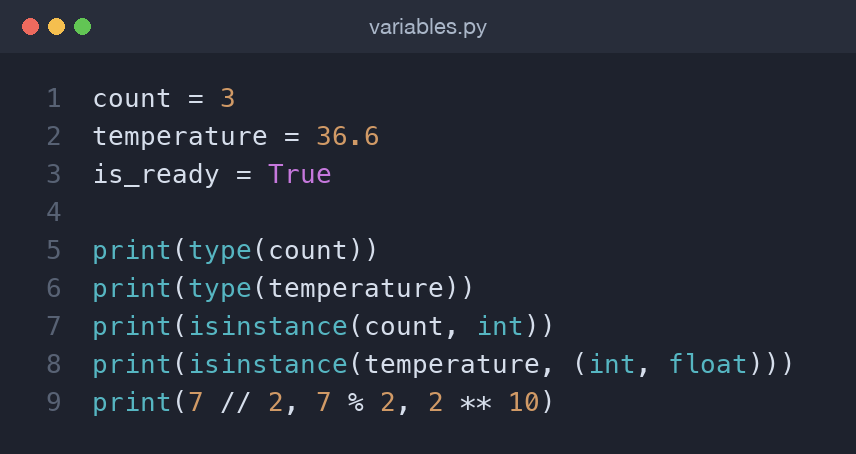
Use type() to see what a value is, and isinstance() to test whether a value is of a given type. isinstance() is what you want in real code because it reads clearly and handles subclasses.
print(type(count))              # <class 'int'>
print(isinstance(count, int))   # True
print(isinstance(temperature, (int, float)))  # True
Arithmetic operators
The everyday operators are +, -, *, and /. Note that / always gives a float, even when the numbers divide evenly. Python adds three more you will use constantly:
//— floor division, which divides and rounds down to a whole number.%— modulo, the remainder after division.**— power, so2 ** 10is1024.
print(7 / 2)    # 3.5   (true division, always float)
print(7 // 2)   # 3     (floor division)
print(7 % 2)    # 1     (remainder)
print(2 ** 10)  # 1024  (power)
Floor division and modulo travel together. minutes // 60 gives whole hours and minutes % 60 gives the leftover minutes, which is exactly how you break a duration into parts.
minutes = 135
print(minutes // 60, "h", minutes % 60, "m")  # 2 h 15 m
Integers in Python have no upper limit, so 2 ** 100 computes exactly with no overflow. Floats, on the other hand, follow the same limited-precision rules every language uses, so 0.1 + 0.2 prints 0.30000000000000004. That is not a Python bug; it is how binary floating point represents decimals. When exact money maths matters, round your results or reach for the decimal module later in the series.
Precedence
Python follows normal maths precedence: ** first, then *, /, //, %, then + and -. When in doubt, add parentheses; they cost nothing and make intent obvious.
print(2 + 3 * 4)     # 14, not 20
print((2 + 3) * 4)   # 20
Augmented assignment
When you update a variable using its own current value, the augmented operators keep things short. total += 5 means exactly total = total + 5, and the same pattern works for -=, *=, /=, //=, %=, and **=.
total = 100
total += 20   # 120
total -= 5    # 115
total *= 2    # 230
Converting between types
Each type has a function that builds a value of that type from another: int(), float(), str(), and bool(). This matters the moment you read input, because input() always hands you a string.
price = float("19.99")   # str -> float, 19.99
year = int("2026")       # str -> int, 2026
label = str(42)          # int -> str, "42"
Two things to watch. int("3.5") raises an error because the string is not a whole number; convert to float first if you need to. And bool() treats 0, 0.0, "", and None as False, while almost everything else is True.
A worked example: a tip calculator
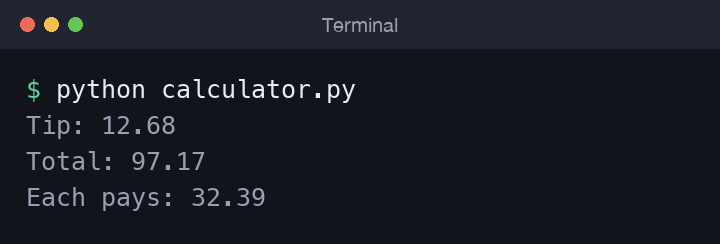
Here is everything together in a small calculation. We take a bill and a tip percentage, work out the tip, and split the total between diners.
bill = 84.50
tip_percent = 15
people = 3

tip = bill * tip_percent / 100
total = bill + tip
per_person = total / people

print(f"Tip: {tip:.2f}")
print(f"Total: {total:.2f}")
print(f"Each pays: {per_person:.2f}")
The :.2f inside the braces formats a float to two decimal places, which is what you want for money. The f prefix on the string turns it into an f-string, letting you drop a variable straight inside {}; we lean on these throughout the series. Notice too that every value here flows through the arithmetic operators from earlier, and the whole thing reads top to bottom like the sum you would do on paper.
The companion repo ships an interactive version, calculator.py, that asks for the bill, tip percentage, and number of diners. Because input() returns a string, it converts each answer with float() and int() before doing the maths — a perfect illustration of why type conversion is not optional busywork but a daily habit.
Constants by convention
Python has no keyword that locks a value, but there is a strong convention: names in UPPER_CASE are meant to be constants and never reassigned. The interpreter will not stop you, but every Python programmer reads the capitals as "do not change this."
TAX_RATE = 0.20
MAX_RETRIES = 3
Common mistakes
- Using
=when you meant==. One assigns, two compares. We will lean on==heavily in the control-flow post. - Expecting
/to give a whole number. Reach for//when you want an integer result. - Forgetting that
input()returns a string, then trying to add it to a number. Convert withint()orfloat()first. - Writing
trueorNULLfrom other languages. Python usesTrue,False, andNonewith those exact capitalisations.
Try it yourself
Open the interpreter or a fresh file and work through these in order:
- Assign your age to a variable, then reassign it to next year's age with
+= 1. - Compute how many whole weeks and leftover days are in 100 days using
//and%. - Convert the string
"3.5"to a float, then to an int, and note which step needs care. - Predict the result of
2 ** 3 ** 2before running it — right-to-left precedence has a say.
Each one takes seconds and cements a concept far better than reading does.
Wrapping up
You can now store values, inspect their types, run every arithmetic operator Python offers, and convert cleanly between numbers and text. These building blocks sit underneath everything that follows. Next up is Working with Strings and Text in Python, where we take the str type much further with slicing, methods, and f-strings.
Comments (0)
No comments yet — be the first to share your thoughts.