

Once your programs grow past a handful of functions, you start to notice the same data and behaviour travelling together: a bank account has a balance and things you can do to it; a shape has dimensions and an area you can compute. Object-oriented programming (OOP) gives you a way to bundle that data and behaviour into a single unit called a class. This is the seventh part of our Python Fundamentals series, and it builds directly on the functions we covered last time — a method is really just a function that lives inside a class.
What classes and objects are
A class is a blueprint. It describes what data an object holds and what it can do. An object (also called an instance) is a concrete thing built from that blueprint. One BankAccount class can produce thousands of individual accounts, each with its own balance, all sharing the same behaviour.
Why bother? Because grouping related state and behaviour keeps code organised as it scales. Instead of passing a loose balance variable into a dozen free functions, you keep the balance inside the account and ask the account to act on itself. The object protects and manages its own data, so the rest of your program can stay blissfully unaware of how a balance is stored.
Think of it as the difference between a pile of loose ingredients and a labelled recipe box. Functions alone can do the job, but as the number of related values grows, keeping them together under one name is what stops your code turning into spaghetti. OOP is not the only way to structure a program, and it is not always the right one, but for modelling "things" with state and actions it fits naturally.
Defining a class
You define a class with the class keyword and, by convention, a name in CapWords style. Here is the smallest useful BankAccount:
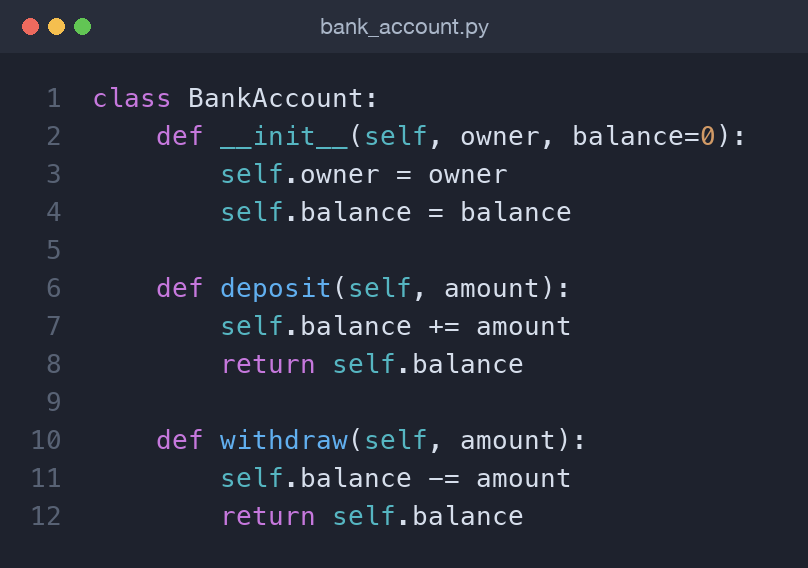
class BankAccount:
    def __init__(self, owner, balance=0):
        self.owner = owner
        self.balance = balance

    def deposit(self, amount):
        self.balance += amount
        return self.balance
__init__ and instance attributes
The __init__ method is the initialiser (often loosely called the constructor). Python calls it automatically whenever you create an object, and its job is to set up the object's starting data. The lines self.owner = owner and self.balance = balance create instance attributes — values that belong to this specific object.
Creating an object looks like calling the class:
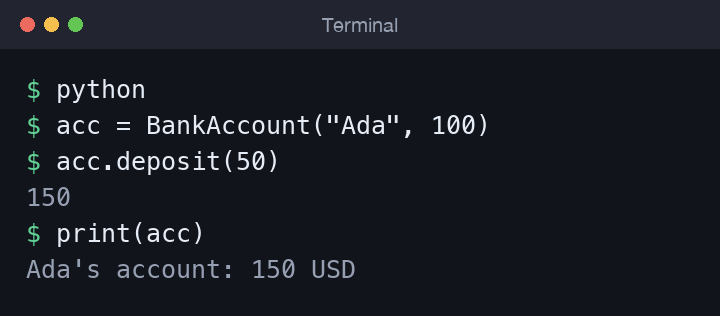
acc = BankAccount("Ada", 100)
print(acc.owner)    # Ada
print(acc.balance)  # 100
Notice you do not pass anything for self; Python supplies it for you. You can create as many accounts as you like, and each keeps its own independent owner and balance. The balance=0 default means the second argument is optional, exactly like the default arguments we saw when covering functions — a class is really a factory for objects, and __init__ is where you decide what a fresh one starts with.
Methods and the role of self
A method is a function defined inside a class. Its first parameter is always self, which refers to the object the method was called on. That is how deposit knows which account's balance to change. When you write acc.deposit(50), Python quietly calls BankAccount.deposit(acc, 50), binding acc to self.
acc.deposit(50)      # balance is now 150
acc.withdraw(30)     # balance is now 120
self is not a keyword — it is just a strong convention. Always name it self so other Python programmers instantly understand your code.
Instance vs class attributes
Instance attributes live on each object. A class attribute is shared by every instance of the class, defined directly in the class body. It is useful for constants or defaults that all objects agree on.
class BankAccount:
    currency = "USD"          # class attribute, shared

    def __init__(self, owner, balance=0):
        self.owner = owner    # instance attribute, per object
        self.balance = balance
Every account reads the same BankAccount.currency, but each has its own balance. Reach for a class attribute when the value truly belongs to the type as a whole, not to one object. One caveat: assigning to acc.currency = "EUR" does not change the class attribute — it quietly creates a new instance attribute that shadows it, affecting only that one object. To change the shared value for everyone, assign to BankAccount.currency instead.
Inheritance and super()
Inheritance lets one class build on another, reusing its behaviour and adding or changing pieces. The new class is the subclass; the one it extends is the base or parent class. Here is a small shape hierarchy where each shape knows its own area:
class Shape:
    def __init__(self, name):
        self.name = name

    def area(self):
        raise NotImplementedError

class Circle(Shape):
    def __init__(self, radius):
        super().__init__("circle")
        self.radius = radius

    def area(self):
        return 3.14159 * self.radius ** 2
Circle(Shape) means Circle inherits from Shape. The call super().__init__("circle") runs the parent's initialiser so we don't repeat the name-setting logic. This is the heart of code reuse in OOP.
Overriding methods
When a subclass defines a method that already exists in its parent, it overrides it. Circle.area overrides the placeholder Shape.area, providing the real calculation. A Rectangle would override it differently. Because both subclasses share the same method name, code that works with shapes doesn't care which concrete type it holds:
shapes = [Circle(2), Rectangle(3, 4)]
for s in shapes:
    print(s.name, round(s.area(), 2))
This is polymorphism: one interface, many implementations. Calling .area() does the right thing for each object, and you can add a new shape later without changing the loop at all. That is a large part of why inheritance is worth the effort — the code that uses your objects stays stable while the family of types grows.
Overriding also lets a subclass extend rather than replace. A subclass method can call super().area() to reuse the parent's result and adjust it, which is handy when the parent already does most of the work.
__str__ and __repr__
By default, printing an object shows something unhelpful like <BankAccount object at 0x104...>. Two special methods fix that. __str__ returns a friendly string for end users, used by print(). __repr__ returns an unambiguous, developer-facing string, ideally one you could paste back into Python.
def __str__(self):
    return f"{self.owner}'s account: {self.balance} USD"

def __repr__(self):
    return f"BankAccount({self.owner!r}, {self.balance})"
If you only write one, make it __repr__ — Python falls back to it when __str__ is missing.
Encapsulation with a leading underscore
Python has no truly private attributes, but it has a strong convention: a single leading underscore, like self._balance, signals "this is internal, please don't touch it from outside." It's a polite fence, not a locked door. You then expose controlled access through methods so invalid states become impossible:
def withdraw(self, amount):
    if amount > self._balance:
        raise ValueError("Insufficient funds")
    self._balance -= amount
Routing every change through withdraw means you can enforce rules in one place — here, that an account can't go negative. If code elsewhere reached in and set _balance directly, it would bypass that check, which is exactly why the underscore warns people off. Combined with a read-only property (shown in the repo), this lets callers read the balance freely while every change still passes through your rules.
A shortcut: @dataclass
Writing __init__ and __repr__ by hand gets repetitive for classes that mostly hold data. The @dataclass decorator generates them for you from a few typed attributes:
from dataclasses import dataclass

@dataclass
class Point:
    x: float
    y: float

p = Point(1.0, 2.0)
print(p)   # Point(x=1.0, y=2.0)
You get __init__, __repr__, and equality comparison for free, so two points with the same coordinates compare as equal without any extra work. Reach for dataclasses when a class is mainly a tidy container for values; when it has rich behaviour and careful validation, a hand-written class like our BankAccount is usually the clearer choice. The two styles happily coexist in the same codebase.
Common mistakes
- Forgetting
selfin a method's parameter list, then getting a confusing "takes 0 positional arguments but 1 was given" error. - Writing
selfwhen you access an attribute, e.g.balanceinstead ofself.balance, so Python looks for a local variable that isn't there. - Using a mutable class attribute (like a shared list) as if it were per-instance — every object ends up sharing the same list. Set mutable defaults inside
__init__. - Skipping
super().__init__()in a subclass, leaving the parent's attributes unset.
Wrapping up
You now know how to define classes, initialise objects with __init__, work with self, distinguish instance from class attributes, and reuse code through inheritance, super(), and method overriding. You've also met __str__, __repr__, the leading-underscore convention, and the handy @dataclass shortcut. Next in the series is Files, Exceptions, and Context Managers in Python, where we handle real data on disk and the errors that come with it.
Comments (0)
No comments yet — be the first to share your thoughts.