

Every real program eventually needs to read or write a file, and every file operation can fail: the file might not exist, the disk might be full, or the data might be malformed. This is the eighth part of our Python Fundamentals series, and it covers the two skills that make your code survive contact with the real world — working with files and handling errors gracefully.

By the end you will know how to open files safely with the with statement, read and write text, dabble in CSV, and turn crashes into controlled, recoverable behaviour using try/except.
Opening files with open()
The built-in open() function is your gateway to a file. You give it a path and a mode, and it hands back a file object you can read from or write to.
The mode is a short string. The three you will use most are:
"r"— read (the default); the file must already exist."w"— write; creates the file, or truncates an existing one to empty."a"— append; creates the file if needed, and adds to the end without erasing.
Add "b" for binary data (images, PDFs) — for example "rb". Always pass encoding="utf-8" for text so your code behaves the same on every machine.
f = open("greeting.txt", "w", encoding="utf-8")
f.write("Hello, file!\n")
f.close()  # easy to forget — and that is the problem
Why the with statement matters
That close() above is a trap. If an error is raised before it runs, the file stays open, buffers may not flush, and on some systems the file stays locked. The fix is a context manager: the with statement guarantees the file is closed the moment the block ends, whether it finishes normally or blows up.
with open("greeting.txt", "w", encoding="utf-8") as f:
    f.write("Hello, file!\n")
# f is automatically closed here, even if write() had failed
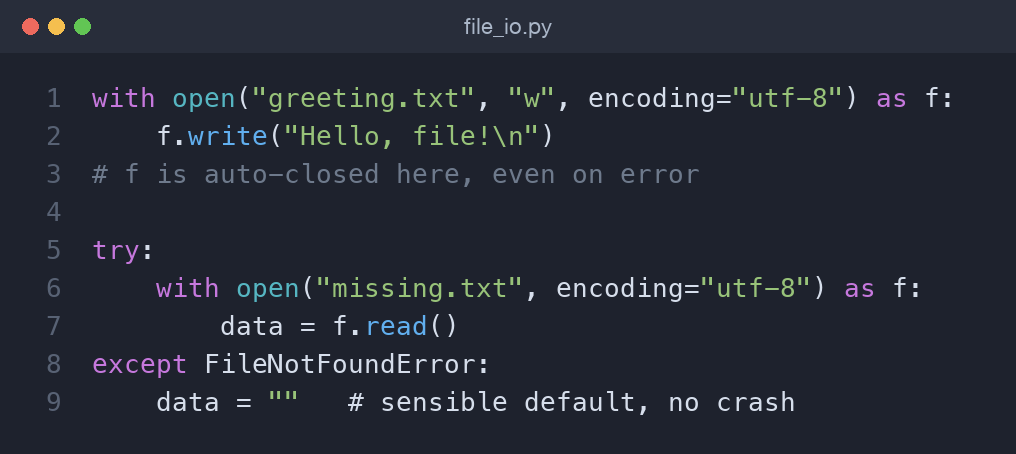
Make with your default. You almost never need to call close() by hand again.
Reading a file: whole vs line by line
Once a file is open for reading, you have choices. For a small file, read() slurps the whole thing into one string. For anything that might be large, iterate line by line — the file object is its own iterator, so it only holds one line in memory at a time.
with open("notes.txt", "r", encoding="utf-8") as f:
    content = f.read()          # entire file as one string

with open("notes.txt", "r", encoding="utf-8") as f:
    for line in f:              # memory-friendly, one line at a time
        print(line.rstrip())    # rstrip() drops the trailing newline
Use readlines() if you genuinely want a list of lines, but the for line in f loop is the idiomatic default.
Writing text
Writing mirrors reading. write() takes a string and — unlike print() — does not add a newline, so you include \n yourself. Use "w" to start fresh or "a" to append.
lines = ["first note\n", "second note\n"]
with open("notes.txt", "a", encoding="utf-8") as f:
    f.writelines(lines)         # writes each string as-is
A quick note on CSV
For tabular data, reach for the csv module rather than splitting on commas yourself — it correctly handles quoting, embedded commas, and newlines inside fields. Pass newline="" when you open the file so the module controls line endings.
import csv

with open("people.csv", "w", newline="", encoding="utf-8") as f:
    writer = csv.writer(f)
    writer.writerow(["name", "role"])
    writer.writerow(["Ada", "engineer"])

with open("people.csv", "r", newline="", encoding="utf-8") as f:
    for row in csv.reader(f):
        print(row)              # each row is a list of strings
Handling exceptions: try/except/else/finally
An exception is Python's way of signalling that something went wrong. Left alone it stops your program with a traceback. You catch it with try/except and decide what to do instead.
The full shape has four parts, and you rarely need all of them at once:
try:
    value = int(input("Enter a number: "))
except ValueError:
    print("That was not a whole number.")
else:
    print(f"Squared: {value ** 2}")   # runs only if no exception
finally:
    print("Done.")                    # runs no matter what
try— the risky code.except— runs if a matching exception occurred.else— runs only whentrysucceeded (keep it small).finally— always runs; ideal for cleanup.
Common exception types
A few exceptions show up constantly, and recognising them speeds up debugging:
ValueError— the type is right but the value is wrong, e.g.int("abc").FileNotFoundError— you tried to read a path that does not exist.KeyError— you asked a dictionary for a key it does not have.TypeError— you combined incompatible types, e.g."3" + 3.
These types are related. Python arranges exceptions in a hierarchy: FileNotFoundError is a kind of OSError, which is a kind of Exception, which is a kind of BaseException. Catching a parent type also catches all of its children, which is why a broad except Exception: scoops up nearly everything. That is exactly the reason to avoid it as your default.
Catch the specific type you expect. A bare except: (or the broad except Exception:) swallows everything — including typos and KeyboardInterrupt — and hides real bugs. Catch narrowly; let the unexpected propagate.
try:
    with open("missing.txt", encoding="utf-8") as f:
        data = f.read()
except FileNotFoundError:
    data = ""                   # sensible default instead of a crash
Raising and defining exceptions
You can signal problems yourself with raise. This is how you enforce rules in your own functions.
def withdraw(balance, amount):
    if amount > balance:
        raise ValueError("Insufficient funds")
    return balance - amount
When a built-in type does not describe your situation well, define a custom exception by subclassing Exception. It makes your intent clear and lets callers catch exactly your error.
class InsufficientFundsError(Exception):
    """Raised when a withdrawal exceeds the balance."""

def withdraw(balance, amount):
    if amount > balance:
        raise InsufficientFundsError(f"Need {amount}, have {balance}")
    return balance - amount
Re-raising after cleanup
Sometimes you want to react to an error — log it, close a resource, roll something back — but still let it travel up to the caller. Catch it, do your cleanup, then use a bare raise to re-throw the same exception with its original traceback intact.
def load_config(path):
    try:
        return Path(path).read_text(encoding="utf-8")
    except FileNotFoundError:
        print(f"Config not found at {path}; falling back to defaults")
        raise                       # re-raise so the caller still decides
Reserve finally for cleanup that must happen either way — closing a network connection, releasing a lock — even when the exception continues on its journey.
A word on pathlib
For anything beyond a single filename, the modern pathlib.Path beats string juggling. It joins paths with the / operator instead of fragile string concatenation, and offers handy checks and helpers that read like plain English.
from pathlib import Path

data_dir = Path("data")
notes = data_dir / "notes.txt"      # os-correct separators, no backslash worries

if notes.exists() and notes.is_file():
    print(notes.read_text(encoding="utf-8"))   # open, read, and close in one call

for csv_file in data_dir.glob("*.csv"):        # iterate matching files
    print(csv_file.name, csv_file.stat().st_size)
read_text() and its partner write_text() handle the open/close cycle for you, so short read-or-write jobs need no explicit with block at all. Use mkdir(parents=True, exist_ok=True) to create folders safely before writing into them.
Worked example: a tiny notes app
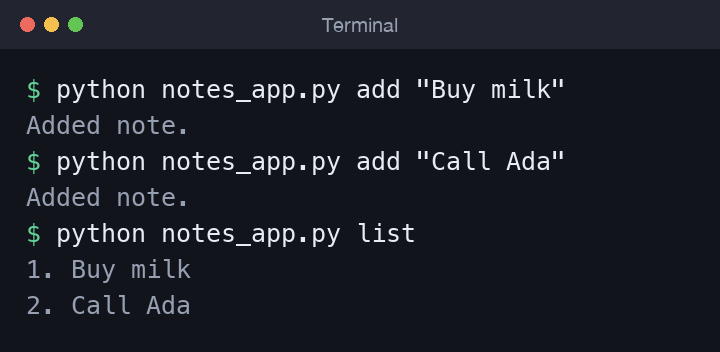
Let's tie it together with a journal that appends a line and reads everything back — surviving a missing file on the very first run.
from pathlib import Path

NOTES = Path("notes.txt")

def add_note(text):
    with open(NOTES, "a", encoding="utf-8") as f:
        f.write(text + "\n")

def read_notes():
    try:
        with open(NOTES, "r", encoding="utf-8") as f:
            return [line.rstrip() for line in f]
    except FileNotFoundError:
        return []               # no notes yet — not an error
The first read_notes() call returns an empty list instead of crashing; after an add_note, the file exists and reads back cleanly.
Common mistakes
- Forgetting
\n, so all your writes run together on one line. - Opening in
"w"when you meant"a", silently wiping existing data. - Using a bare
except:that hides the real error — always name the type. - Skipping
encoding="utf-8", then hitting garbled text on another OS. - Doing work inside
finallythat itself can fail, masking the original error. - Calling
open()withoutwithand never closing it, leaking file handles until the program eventually runs out. - Catching
Exception(or worse, bareexcept:) so broadly that a simple typo in thetryblock gets silently swallowed as if it were an expected failure. - Mutating a file while you iterate over it — deleting or rewriting lines mid-loop gives confusing, half-processed results. Read everything you need first, then write the changes in a separate step.
Wrapping up
Files and exceptions turn scripts into dependable tools: with guarantees clean-up, and try/except lets you recover instead of crash. Practise by extending the notes app — add a search command, or write notes as CSV rows with a timestamp. Next in the series is Modules, Packages, and Virtual Environments in Python, where we organise growing code into reusable pieces and isolate their dependencies.
Comments (0)
No comments yet — be the first to share your thoughts.