

You have learned the pieces — variables, strings, collections, control flow, functions, classes, files, and modules. This final part of our Python Fundamentals series does two things: it shows you how to prove your code works with automated tests, and it puts everything together into a real project you can run. By the end you will have a tested command-line to-do app and a map of where to go next.
Testing is what separates code you hope works from code you know works. It is also the fastest way to change code with confidence, because a good test tells you the moment you break something.
Why testing matters
When a program is small, you test it by running it and eyeballing the output. That does not scale. The tenth time you tweak a function, re-checking every case by hand is slow and error-prone — and you will skip cases you are sure are fine. Automated tests run every case in a fraction of a second, every time, and they turn "I think this still works" into a green checkmark.
There is a second, subtler payoff. Writing a test forces you to think about what a function should actually do — its inputs, its output, and how it behaves when things go wrong. That pressure tends to produce smaller, clearer functions, because a function that is hard to test is usually a function that is doing too much. Testing is as much a design tool as a safety net.
The assert statement
The simplest test tool is built into the language. assert checks that a condition is true and raises AssertionError if it is not.
def add(a, b):
    return a + b

assert add(2, 3) == 5
assert add(-1, 1) == 0
print("All checks passed.")
If every assertion holds, the script prints its message and exits cleanly. Flip one expected value and Python stops at the failing line. This is fine for a quick sanity check, but real projects want a framework that finds tests, runs them all, and reports nicely.
unittest: the standard library option
Python ships with unittest. You subclass TestCase and write methods whose names start with test_, using assertion helpers like assertEqual.
import unittest
from calc import add

class TestAdd(unittest.TestCase):
    def test_positives(self):
        self.assertEqual(add(2, 3), 5)

if __name__ == "__main__":
    unittest.main()
It works everywhere with no install, and you run it with python -m unittest. The class boilerplate is heavier than most people want, though, and the assertEqual family of methods is a lot to remember. That is why the wider community reaches for pytest, which keeps the same ideas with far less ceremony.
pytest: less ceremony, more testing
pytest lets you write a test as a plain function with a plain assert. It is a third-party package, so install it into your virtual environment (from the previous post) first.
pip install pytest
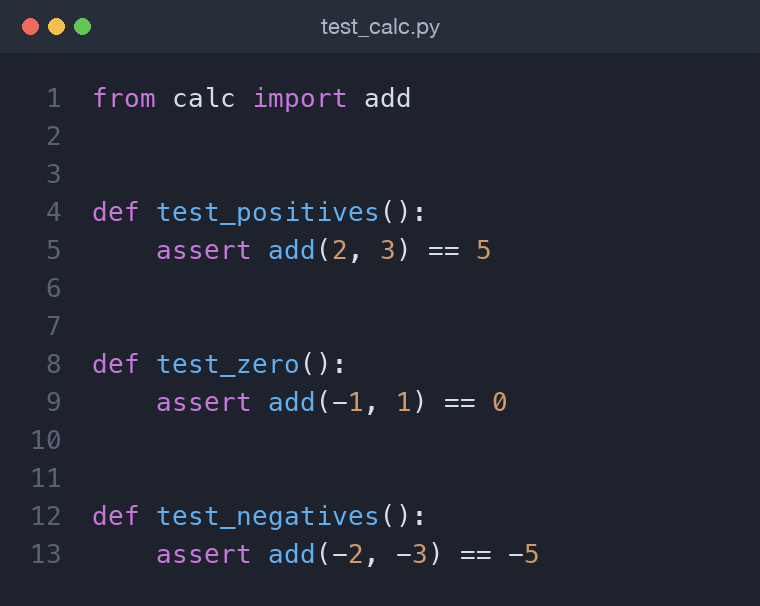
A test file is just a module named test_*.py containing functions named test_*. Here is the same check with pytest:
from calc import add

def test_positives():
    assert add(2, 3) == 5

def test_zero():
    assert add(-1, 1) == 0
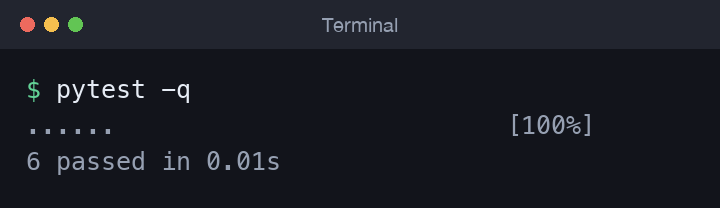
Run pytest in the project folder and it discovers every test file, runs every test function, and prints a summary — with a rich, readable diff when something fails. When a test breaks, that diff shows you the expected and actual values side by side, so you rarely need to add print statements to see what went wrong.
A good test follows a simple rhythm often called arrange-act-assert: set up the inputs, call the thing under test, then assert on the result. Keeping tests in that shape makes them read like tiny specifications of how your code should behave, which is exactly what they are.
Structuring a small project
A tidy layout keeps your app code and your tests side by side but separate:
10-todo-project/
    todo.py        # the app and its core functions
    test_todo.py   # the pytest tests
    README.md
Keep the logic in importable functions and keep the command-line glue thin. That way your tests can import and call the functions directly without the terminal getting involved. This is the single most valuable habit for testability: the more your logic depends on files, network calls, or user input, the harder it is to test, so push those effects to the edges and keep a clean, pure core in the middle.
As a project grows you might move the tests into their own tests/ folder and add a requirements.txt listing pytest, but the two-file layout above is a perfectly good place to start.
The capstone: a to-do CLI
Let us build something that uses the whole series at once — functions, a list of dictionaries, JSON files, and exceptions. The heart of the app is a few pure functions that take the current tasks and return new tasks, never touching the disk. Pure functions are a joy to test.
def add_task(tasks, title):
    title = title.strip()
    if not title:
        raise ValueError("Task title cannot be empty.")
    next_id = max((t["id"] for t in tasks), default=0) + 1
    return tasks + [{"id": next_id, "title": title, "done": False}]

def complete_task(tasks, task_id):
    if not any(t["id"] == task_id for t in tasks):
        raise KeyError(f"No task with id {task_id}.")
    return [
        {**t, "done": True} if t["id"] == task_id else t
        for t in tasks
    ]
Persistence lives in its own two functions. Loading gracefully handles a first run where no file exists yet — exactly the exception handling from part eight.
import json

def load_tasks(path):
    try:
        with open(path, encoding="utf-8") as f:
            return json.load(f)
    except FileNotFoundError:
        return []

def save_tasks(tasks, path):
    with open(path, "w", encoding="utf-8") as f:
        json.dump(tasks, f, indent=2)
A thin main() reads the command line from sys.argv, loads the tasks, calls the right core function, and saves the result. Notice how each layer has one job: the core functions transform data, the persistence functions talk to the disk, and main() only translates commands into calls.
def main(argv):
    command, *rest = argv
    tasks = load_tasks(DATA_FILE)
    if command == "add":
        tasks = add_task(tasks, " ".join(rest))
        save_tasks(tasks, DATA_FILE)
    elif command == "list":
        print(format_tasks(tasks))
So python todo.py add "Buy milk" adds a task and python todo.py list prints it. The full version, with a done command and friendlier output, is in the companion repo.
Testing the core
Because the logic is pure, the tests are short and obvious. Each one arranges some tasks, acts, and asserts on the result — including the error cases.
import pytest
from todo import add_task, complete_task

def test_add_assigns_first_id():
    tasks = add_task([], "Learn testing")
    assert tasks[0]["id"] == 1

def test_complete_unknown_id_raises():
    with pytest.raises(KeyError):
        complete_task([], 99)
pytest.raises is the clean way to assert that a call should fail. Run pytest and you get a row of dots and a green summary.
When you find yourself writing the same test with different inputs, @pytest.mark.parametrize lets you supply a table of cases and runs the test once per row — useful once your project grows. And when several tests need the same starting data, a fixture builds it once and hands it to each test. You do not need either to begin; plain functions and assert will carry you a long way.
Try it yourself
- Add a
remove_task(tasks, task_id)function and a test for it. - Make
listshow only unfinished tasks when you pass--pending. - Write a test that saves tasks to a temporary file and loads them back, proving persistence round-trips.
Common mistakes
- Testing the terminal glue instead of the logic. Keep the core in pure functions and test those directly.
- Only testing the happy path. The bugs hide in the empty list, the missing id, and the corrupt file — assert on those too.
- Naming files or functions without the
test_prefix, then wondering why pytest finds nothing. - Letting tests depend on real files or on each other's leftovers; each test should set up its own data.
Wrapping up
Across ten parts you went from installing Python to writing, structuring, and testing a real application — passing through types, strings, collections, control flow, functions, classes, files, and modules along the way. The habits that carry you forward are small functions, clear names, and tests that let you change code without fear. From here, pick a direction that excites you:
- Web development — Flask for small, hands-on apps, or Django when you want batteries included: routing, templates, and a database layer.
- Data and analysis — pandas for tabular data, plus Matplotlib for charts, is the gateway into data science and machine learning.
- Automation — small scripts that rename files, call APIs, or tidy spreadsheets turn Python into a quiet assistant that saves you hours.
Whichever you choose, keep the discipline you built here — write a little, test it, and grow the project one confident step at a time.
Comments (0)
No comments yet — be the first to share your thoughts.