

DevOps on AWS is not a job title you earn by learning forty services. It is a way of shipping software where the path from a developer's commit to a running, observable system is automated, repeatable and owned by the team that writes the code. AWS happens to give you every building block for that path, which is both its strength and the reason beginners feel lost in the console.
This series walks that path end to end. Over ten parts we go from an empty AWS account to a containerised application deployed through a pipeline, running on ECS and EKS, monitored with CloudWatch and released with zero-downtime strategies. This first part draws the map so every later part has a place to land.
What a DevOps engineer on AWS actually does
Strip away the buzzwords and the work falls into five recurring jobs:
- Provision infrastructure — networks, compute, databases and permissions, defined as code so they can be reviewed and recreated.
- Build and test — turn source code into a versioned, tested artifact (a container image, a zip, a package) on every change.
- Deploy — move that artifact into environments safely, with a way back if something breaks.
- Observe — collect logs, metrics and traces so you know whether the system is healthy before your users tell you.
- Secure and govern — least-privilege access, secrets that never live in Git, and an audit trail of who changed what.
Every AWS service you will meet in a DevOps role exists to serve one of these five jobs. When a new service appears in a job description, ask which job it does, and it stops being intimidating.
The services map
Here is the shortlist that covers the vast majority of real-world AWS DevOps work, grouped by job:
| Job | Core AWS services | Common non-AWS companions |
|---|---|---|
| Provision | VPC, EC2, IAM, CloudFormation | Terraform |
| Build & test | CodeBuild, ECR | GitHub Actions, Docker |
| Deploy | ECS, EKS, CodeDeploy, Lambda | Helm, Argo CD |
| Observe | CloudWatch, X-Ray, CloudTrail | Prometheus, Grafana |
| Secure | IAM, Secrets Manager, KMS, SSM | OIDC federation |
You do not need all of these on day one. A surprising number of production systems run on just VPC, IAM, ECR, ECS, CloudWatch and a CI tool. That is exactly the stack this series builds.
Accounts, regions and the shared responsibility model
Before touching any service, understand the three ideas that shape every decision you make on AWS.
Accounts are your strongest boundary. Permissions, billing and blast radius are all scoped to an account. Mature teams use separate accounts for development, staging and production, tied together with AWS Organizations. If a pipeline credential leaks from the dev account, production is untouched. Even as a solo learner, create a separate account for experiments rather than using the one tied to your company.
Regions are independent. A VPC, an ECR repository or an ECS cluster lives in one region. Pick one region close to your users (for India, ap-south-1 in Mumbai is the usual choice) and stay in it while learning, or you will spend an afternoon wondering where your resources went.
Security is shared. AWS secures the physical data centres, the hypervisors and the managed service internals. You secure everything you configure: who can call which API, which ports are open, what is encrypted, and which secrets your applications can read. Most AWS security incidents in the news are configuration mistakes on the customer side, not breaches of AWS itself.
Setting up a safe learning account
Do these five things before anything else. They take twenty minutes and prevent the two classic beginner disasters: a leaked root key and a surprise bill.
- Lock away the root user. Enable MFA on the root account, then never use it again for daily work.
- Create an admin identity through IAM Identity Center rather than long-lived IAM user access keys. You sign in through a portal and get short-lived credentials.
- Set a budget alarm. In AWS Budgets, create a monthly cost budget (even a small one) with an email alert at 80%. Forgotten load balancers and NAT gateways are the usual culprits.
- Turn on CloudTrail so every API call in the account is recorded. You will thank yourself the first time something changes and nobody knows why.
- Install and configure the AWS CLI with a named profile that uses your Identity Center login.
The last step is where you first touch the command line, and it is worth getting right because every later part of this series uses it.
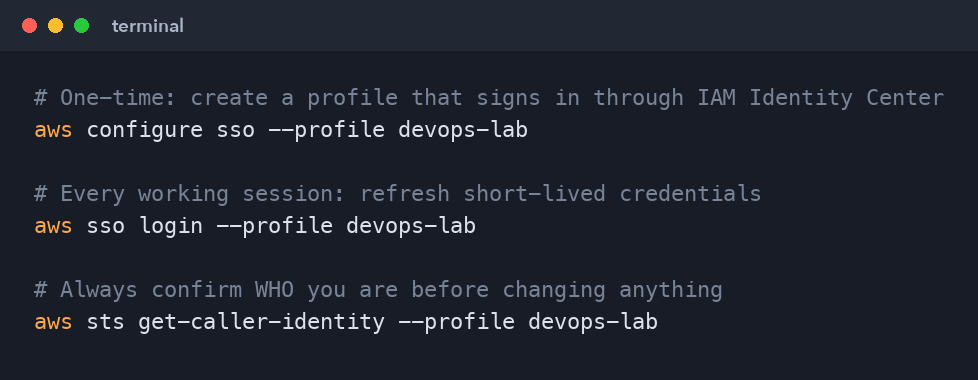
# One-time: create a profile that signs in through IAM Identity Center
aws configure sso --profile devops-lab

# Every working session: refresh short-lived credentials
aws sso login --profile devops-lab

# Always confirm WHO you are before changing anything
aws sts get-caller-identity --profile devops-lab
sts get-caller-identity is the most underrated command in AWS. Run it whenever a command fails with "access denied" or behaves strangely; half the time you are simply logged in as the wrong identity or in the wrong account.
The pipeline we will build
By the end of the series, a commit to the main branch of a sample web API will trigger this flow:
- GitHub Actions checks out the code, runs unit tests and builds a Docker image.
- The workflow assumes an IAM role through OIDC (no stored AWS keys) and pushes the image to Amazon ECR.
- Terraform has already created the VPC, the ECS cluster, the load balancer and the IAM roles.
- The workflow updates the ECS service to the new image; ECS performs a rolling deployment behind an Application Load Balancer.
- CloudWatch collects container logs and metrics; an alarm on error rate can trigger a rollback.
- The same image is later deployed to EKS to compare the Kubernetes path.
Each part of the series adds one layer of this picture, so you always know why you are learning the current topic.
Skills to have in place first
AWS DevOps sits on top of a few fundamentals. If any of these feel shaky, spend a week on them before part three:
- Linux command line — navigating files, permissions, processes,
curl,sshand reading logs. - Git — branches, pull requests, merge versus rebase, and resolving a conflict without panic.
- One scripting language — Bash plus a little Python is ideal for automation glue.
- Networking basics — IP addresses, CIDR ranges, ports, DNS and the difference between public and private traffic.
- Containers — what an image is, how a
Dockerfilebuilds one, and how a container differs from a VM.
You do not need to be an expert in any of them. You need to be comfortable enough that they do not distract you while you learn the AWS layer.
How to study this series
Read each part, then rebuild it yourself without looking. The difference between a candidate who has "read about ECS" and one who has deployed to ECS, broken it and fixed it is obvious within five minutes of an interview. Keep a running NOTES.md of every error you hit and how you solved it; that file becomes your best interview preparation.
Delete what you create at the end of each session, or keep everything in Terraform so terraform destroy cleans up in one command. Cost discipline is a DevOps skill in its own right.
What's next
In part two we tackle the foundation everything else depends on: IAM. You will learn how users, roles and policies actually evaluate, why roles beat access keys every time, and how to let a CI pipeline deploy to AWS without storing a single secret.
Comments (0)
No comments yet — be the first to share your thoughts.